


"Application Moved" error when running Photoshop Elements 13
Hi
I'm running Photoshop Elements 13 on a Mac High Sierra (10.13.6). The Mac Pro (mid 2010) can't be upgraded past High Sierra, but it does have 32GB of RAM and good, fast quad core processors.
The "Organizer" does not run. It has various missing components.
The Photo Editor does run though. Before working properly, it gives me this error:
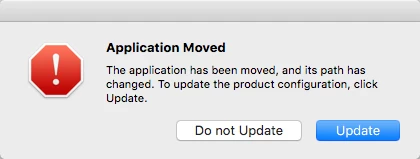
If I click "Update" and update it, it doesn't fix anything and I still get this same error next time.
If I click "Do not update" it moves on and runs the app.
So either way, it does not fix the path error, and I see this error every time I run it.
Some things I've tried:
1. Uninstalling all Adobe apps and running the cleaner, and then doing a fresh install. Outcome: it still works exactly the same way with the same error.
The installation file was downloaded directly from the relevant links given to me by Adobe support (also, I downloaded from the official site for the 2018, 2019, and 2020 versions - below).
2. Installing trial versions of Photoshop Elements 2020 (the latest version that is meant to run on High Sierra) and 2019 and 2018, to see if one of those works properly. Outcome: 2020 installs ok, but then does not run (I get an "Application is not responding" in the Activity Monitor when the installer launches the program or I run the program directly). Same if I try to run the photo editor or organiser app directly. I get the same thing with Elements 2019 and 2018 as well. I tried installing Elements 2020 from a different user account (an Admin one) and it works the same way.
3. Cleaning out things from old user and system library folders on old disks (I used to boot from another drive). I renamed the Adobe folders under Application Support on the OLD drive, to make sure it wasn't using those folders by mistake. No impact.
Sp, my question is: what can you suggest to help me get rid of this "Application Moved" error, and to get Photoshop Elements 13 running properly on my Mac?
Thanks!
 AdChoices