

Badwolf_DW
Known Participant
December 14, 2019
Question

Auto Photo Collage - Identify picture filenames

  • December 14, 2019
  • 1 reply
  • 847 views

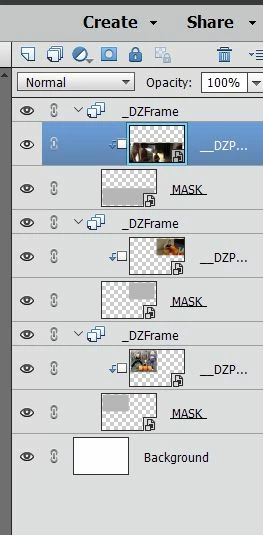
Elements 2020, the auto creation tool often creates photo collages.  When editing the collage, I can't figure out how to identify the photos that it includes. I just want to find the filename or where each photo is located. When looking at the photos in the layers they all are just named _DZPHOTO


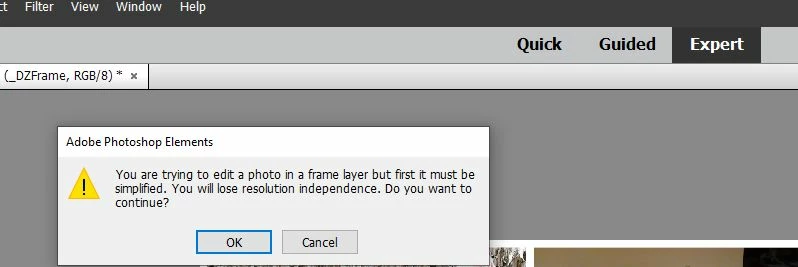
Also I wanted to edit one of the photos after switching to Exprt mode, but when i attempt to I get "You are trying to edit a photo in a frame layer but first it must be simplified. You will lose resolution independence. Do you want to continue?" - What does this mean?  Do i have to just make it "simplified mode" to adjust colors, etc?
This topic has been closed for replies.

1 reply

MichelBParis
Legend
December 14, 2019

In your screenshot of the layer palette, all the layers which have a small icon in the bottom right corner are smart layers.

That means that they are not normal layers containing the pixels copied from the source files. They contain a link to the original source together with a contextual pixel preview for the layer. What you are seeing is a preview of how you have edited that layer: its size, position, rotation... When you change something in those parameters, for instance when you reduce the size, then upsize, the preview is recalculated from the original source. If you reduce a standard layer, when you upsize it later, you lose resolution.

This is an advantage, but a number of edits on a layer can't be applied on a smart layer, you must have a conversion to a normal pixel layer. That's called 'simplifying'. No problem to simplify when you know you won't have to upsize significantly the layer afterwards.


I don't use much the auto photo collage (you'll get more help by other users) but when I do manual collage, when I keep the cursor on a smart layer name in the layers palette, the name of the file does appear after a few seconds.

Badwolf_DW
Known Participant
December 15, 2019
Thanks so much for the explanation ! It makes sense now and clears things
up!