
Participant
October 5, 2017
Answered

Automatic Sorting, Tagging and Auto Curate

  • October 5, 2017
  • 4 replies
  • 1346 views

I would quite like to upgrade to Elements 2018, but this paragraph in the announcement e-mail worries me:

"Go from hundreds of mystery folders to a visual view of your photos and videos — automatic sorting and visual tagging make them easy to find. And now you don’t have to search for your standout photos, because Auto Curate shows you the best ones based on quality, faces, subjects, and more."

I don't want Elements to re-arrange, or automatically add to, or edit any metadata in any of my image files (I have my own system for doing that).  Can I be sure that this won't happen?

Many thanks
    This topic has been closed for replies.
    Correct answer MichelBParis

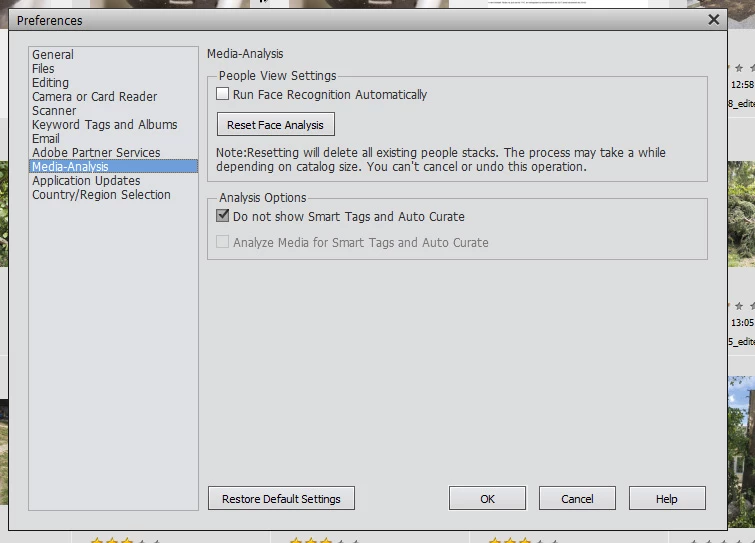
    Have a look at the preferences:

    I have not yet tried the feature, but I can disable it.

    I think it will have no effect on your own system.

    4 replies

    JemderAuthor
    Participant
    October 5, 2017

    Thanks for those answers and the extra information.  I can make a decision now.  Incidentally, I am using Elements 14 at present and had no idea that the media settings as described by Michel are available in that version.  When I looked, both setting were "on", but nothing untoward has happened to my images anyway!

    99jon
    Legend
    October 5, 2017

    You may find this of interest.  I have posted a summary of the new features in Elements 2018 on my blog which can be accessed at this link:

    What’s New

    I also wrote a blog 12 months ago when smart tags were first introduced. If you are using an older version of PSE, both articles will give you a good overview.

    New Features in PSE15 – October 2016

    99jon
    Legend
    October 5, 2017

    Nothing is added to metadata. Machine learning technology is used only within the catalog e.g. if you wished to search for sunsets or water etc.

    As indicated by Michel, you can disable the analysis in prefs.

    MichelBParis
    MichelBParisCorrect answer
    Legend
    October 5, 2017

    Have a look at the preferences:

    I have not yet tried the feature, but I can disable it.

    I think it will have no effect on your own system.