
Participant
January 31, 2025
Answered

automatische Stapelung von je 3 unterschiedlichen Foto Formaten beim Import in PS elements Organizer

  • January 31, 2025
  • 2 replies
  • 149 views

Ich möchte mit der Software DXO pureraw auf einmal hunderte Raw Bilder zu DNG und JPG Bilder entwickeln und alle Bilder in 3 Formaten in einem Ordner speichern. Beim Export/Import in den Organizer von Photoshop elements können die zueinander passenden RAW, DNG und JPG Bilder leider nicht automatisch gestapelt werden.

Jedoch kann beim Import von Kamera oder SD eine automatische Stapelung von RAW mit passendem JPG voreingestellt werden.

Gibt es einen Trick oder ein Plugin.....  wie 3 verschiedene Foto Formate mit gleichem Namen, von einem Ordner importiert, im Organizer automatisch gestapelt werden können?
Correct answer Greg_S.

@Andrei_D has given an excellent suggestion, although I am not sure whether the Adobe Photo Downloader can handle 3 different formats.  It is certainly worth a try.


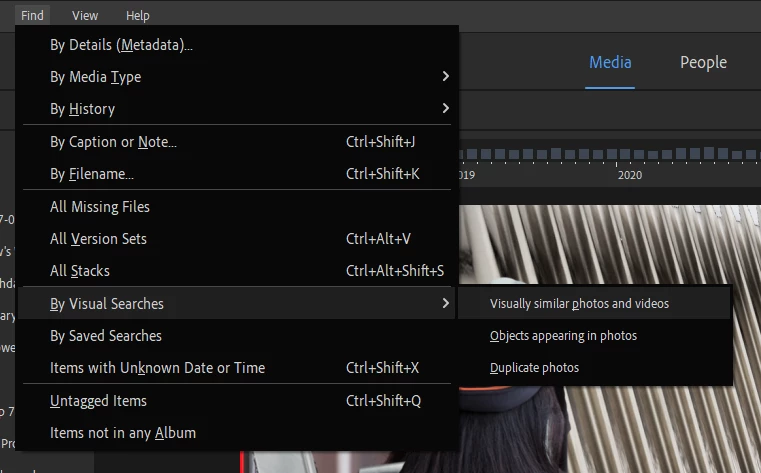
Another possible solution is to use the Find>By Visual Searches>Visually Similar Photos and Videos.  This should allow for stacking of the three formats.  But, if you are shooting in bursts, for example, the similarity of the photos may group different shots in the burst together.


2 replies

Greg_S.
Community Expert
Greg_S.Community ExpertCorrect answer
Community Expert
February 16, 2025

@Andrei_D has given an excellent suggestion, although I am not sure whether the Adobe Photo Downloader can handle 3 different formats.  It is certainly worth a try.


Another possible solution is to use the Find>By Visual Searches>Visually Similar Photos and Videos.  This should allow for stacking of the three formats.  But, if you are shooting in bursts, for example, the similarity of the photos may group different shots in the burst together.


Inspiring
February 16, 2025

Hello,

Have you tried to record all the 3 formats to a SD card

and then importing them from the card?