
sharon1958
Participant
March 8, 2019
Answered

Background Eraser tool

  • March 8, 2019
  • 2 replies
  • 1254 views

I just downloaded the trial version (for now)-- so I can refamiliarize myself with updated Elements.  I am trying to find the background tool but it is non-existant. I have looking online in help and go to the brushes section and there still is not a background erase tool like I have used before... I have a short project due in 2 days and really need the help.
    This topic has been closed for replies.
    Correct answer Greg_S.

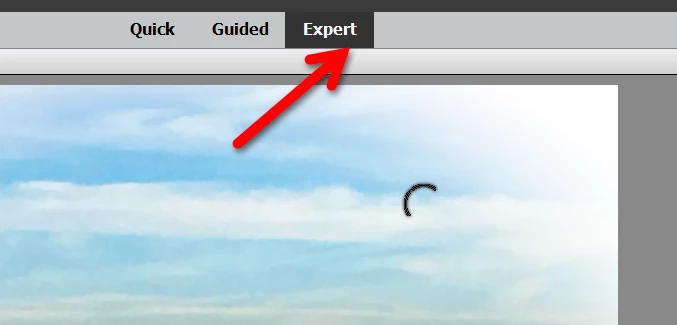
    As John is probably suggesting, are you in Quick or Guided edit modes?  You need to be in Expert mode to access the eraser tool.

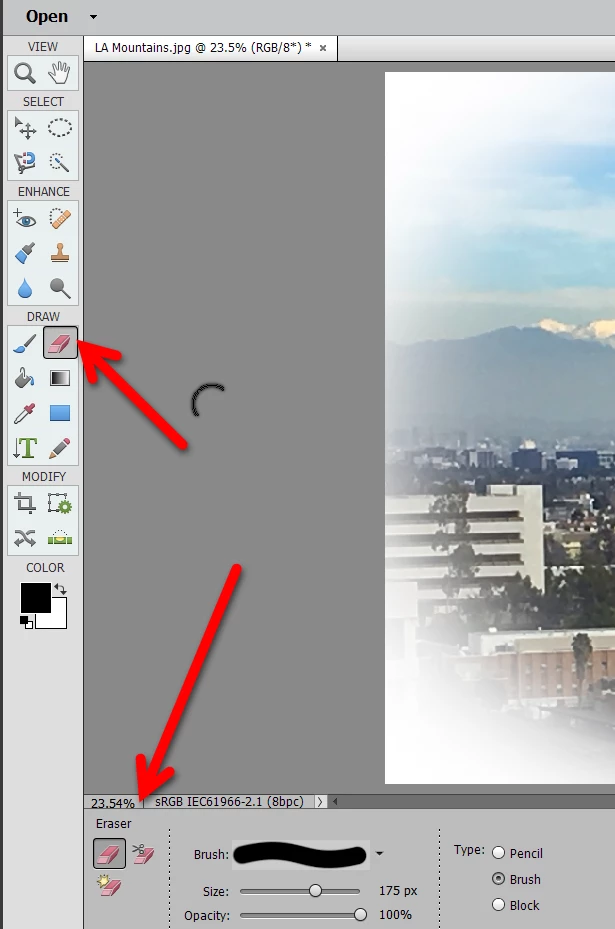
    In Expert mode, you will find the tool where you probably expect it and can adjust the tool options at the bottom of the screen.

    2 replies

    Greg_S.
    Community Expert
    Greg_S.Community ExpertCorrect answer
    Community Expert
    March 9, 2019

    As John is probably suggesting, are you in Quick or Guided edit modes?  You need to be in Expert mode to access the eraser tool.

    In Expert mode, you will find the tool where you probably expect it and can adjust the tool options at the bottom of the screen.

    John Waller
    Community Expert
    Community Expert
    March 8, 2019

    Can you post a screenshot of your display in Expert mode in PSE 2019?