Participant
July 27, 2021
Answered

Blurry creation

  • July 27, 2021
  • 2 replies
  • 287 views

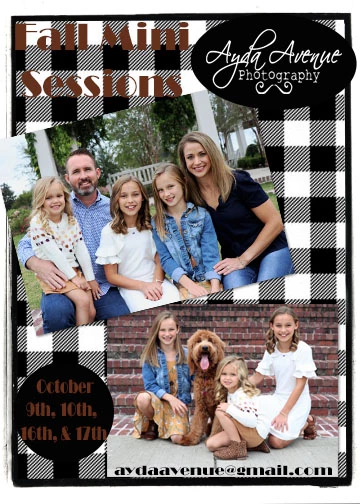
I am making a flyer with shapes and texts and pictures. The pictures are clear until I put them on this flyer. Same with the fonts and shapes. When I saved this to my computer the whole thing looks blurry. Any idea why. This never used to happen... 

This topic has been closed for replies.
Correct answer hatstead

What is the resolution of this composite ?

Looking at your posting, the top picture looks fairly sharp, the bottom picture with the dog does look blurry.

The rule of thumb is that for printing, it is desirable to have the resolution in the 240-300 px/in range. For posting on the web 72 px/in (minimum) should be ok.

If you decide to start over, increase the resolution of the components via Image>resize>image size with resampling & constrain proportions checked in the dialog. Also, the background layer (File>new>blank layer) should have the same resolution value.

If one of the pictures look blurry prior to any manipulation on your part, sharpen it prior to insertion.


2 replies

Glenn 8675309
Legend
July 27, 2021

Make sure you view it at 100% as well... less or more than that it could look a bit wonky. 

hatstead
hatsteadCorrect answer
Inspiring
July 27, 2021

What is the resolution of this composite ?

Looking at your posting, the top picture looks fairly sharp, the bottom picture with the dog does look blurry.

The rule of thumb is that for printing, it is desirable to have the resolution in the 240-300 px/in range. For posting on the web 72 px/in (minimum) should be ok.

If you decide to start over, increase the resolution of the components via Image>resize>image size with resampling & constrain proportions checked in the dialog. Also, the background layer (File>new>blank layer) should have the same resolution value.

If one of the pictures look blurry prior to any manipulation on your part, sharpen it prior to insertion.

Lshorty80Author
Participant
July 28, 2021

Thank you this worked to start over and make everything at 300!!! 

hatstead
Inspiring
July 28, 2021

You're welcome. Glad to help.