
Answered
Brush don't work anymore
my brush tool does not work anymore, the brushes are gone and when I click on it, my program crashes. Before the program crashes I see a very small square in the photo window as i click on the brush tool
my brush tool does not work anymore, the brushes are gone and when I click on it, my program crashes. Before the program crashes I see a very small square in the photo window as i click on the brush tool
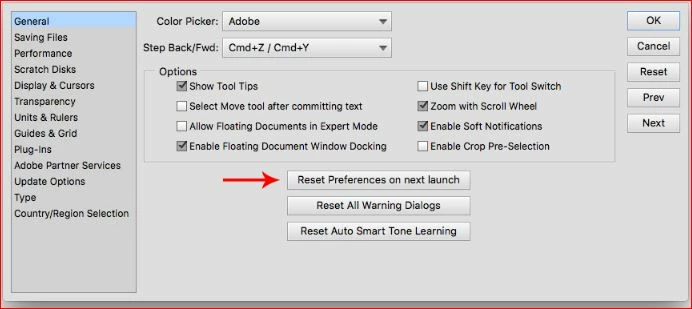
Try resetting preferences.
Go to Edit>preferences.general and look for this:
Maybe this is the problem :
Error: An integer between 50 and 8 is required | Windows 10
I followed the steps, and got an update, but the problem stiill is the same,
When I come to the brusch, the program crachst
The program works on my old laptop ok, but that one is much to slow.. And it works on the new one perfectly till now, maybe its because a windows update???
I dont now what te do next.
Already have an account? Login
Enter your E-mail address. We'll send you an e-mail with instructions to reset your password.
 AdChoices