Participating Frequently
Jan 19, 2024 6:43 PM UTC
Answered

Brush Preset Picker PSE 2024

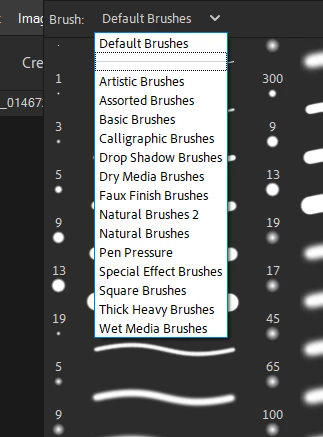
In PSE 2020 when I expand my brushes preset picker to choose another brush set I am able to see the full names of the brush sets I have installed BUT

In PSE 2024 it’s different. The brush preset picker there is much narrower not allowing me to see the full names of the brushes and I can’t see any way of expanding it.


I would appreciate any help with this as I find it sooooo frustrating.

If it’s important - I am running Windows 10.

Thank you...



This topic is closed to new replies. Start a new post to keep the conversation going.
Greg_S.
Greg_S.Correct answer
Community Expert
Jan 20, 2024 1:43 AM UTC

Glenn, as I understand, it the OP is talking about the dropdown list of brush presets, not the display options for the brushes themselves.


11 replies

Greg_S.
Community Expert
Greg_S.Community ExpertCorrect answer
Community Expert
Jan 20, 2024 1:43 AM UTC

Glenn, as I understand, it the OP is talking about the dropdown list of brush presets, not the display options for the brushes themselves.


Translate
Glenn 8675309
Legend
Jan 20, 2024 1:49 AM UTC

roger roger

Translate
Glenn 8675309
Legend
Jan 20, 2024 2:05 AM UTC

Of course, as usual, it's not an issue with Photoshop.

Translate
Glenn 8675309
Legend
Jan 20, 2024 1:04 AM UTC


Click on the kebob, the tree dots in the upper right corner of the brush selection tool. 

Translate
Glenn 8675309
Legend
Jan 20, 2024 1:06 AM UTC

This is the large list from the brush kebob menu.

Translate
Greg_S.
Community Expert
Community Expert
Jan 20, 2024 1:02 AM UTC

Yes, Jeff, but the OP is complaining about the width of the dropdown menu within the tool panel.  Do you have some trick to expand that?

(I was merely commenting on the change in behavior of the tool since earlier versions.  I think the change started in Elements 2021.  An odd but different behavior was also introduced with the Shape tool.)

Translate
Jeff Arola
Community Expert
Community Expert
Jan 19, 2024 11:35 PM UTC

You can get the Brush Picker full screen by having the brush tool selected , right clicking in the upper part of the document and adjusting the brush picker by grabbing the right top corner of the brush picker and dragging.

It might take a couple of trys or so to resize to almost the whole screen.


Translate
Greg_S.
Community Expert
Community Expert
Jan 19, 2024 8:05 PM UTC

Yes, there has been an unfortunate change since PSE 2020 in the way the dialog can be expanded.  Not only is the setname dropdown menu narrower, but the brush set dialog can only be expanded to fill half the screen rather than the full screen.

This is not something that bothers me, but I know a number of users do not like the change in behavior.  I know of no way to change this.


Translate
Toe_RagAuthor
Participating Frequently
Jan 19, 2024 8:41 PM UTC

I am really disappointed.   I just don't understand why software developers change things which weren't broken. All they succeed in doing is annoying their customers.

Translate