philipdp
Participating Frequently
March 22, 2017
Answered

Camera RAW opening very small image in Photoshop elements

  • March 22, 2017
  • 1 reply
  • 2140 views

Hi

Can someone help me please?  I have just installed Photoshop Elements 15 including the latest updates, which include Camera RAW v9.9.0.718.  I have confirmed my camera is compatible with this (Canon EOS500D).

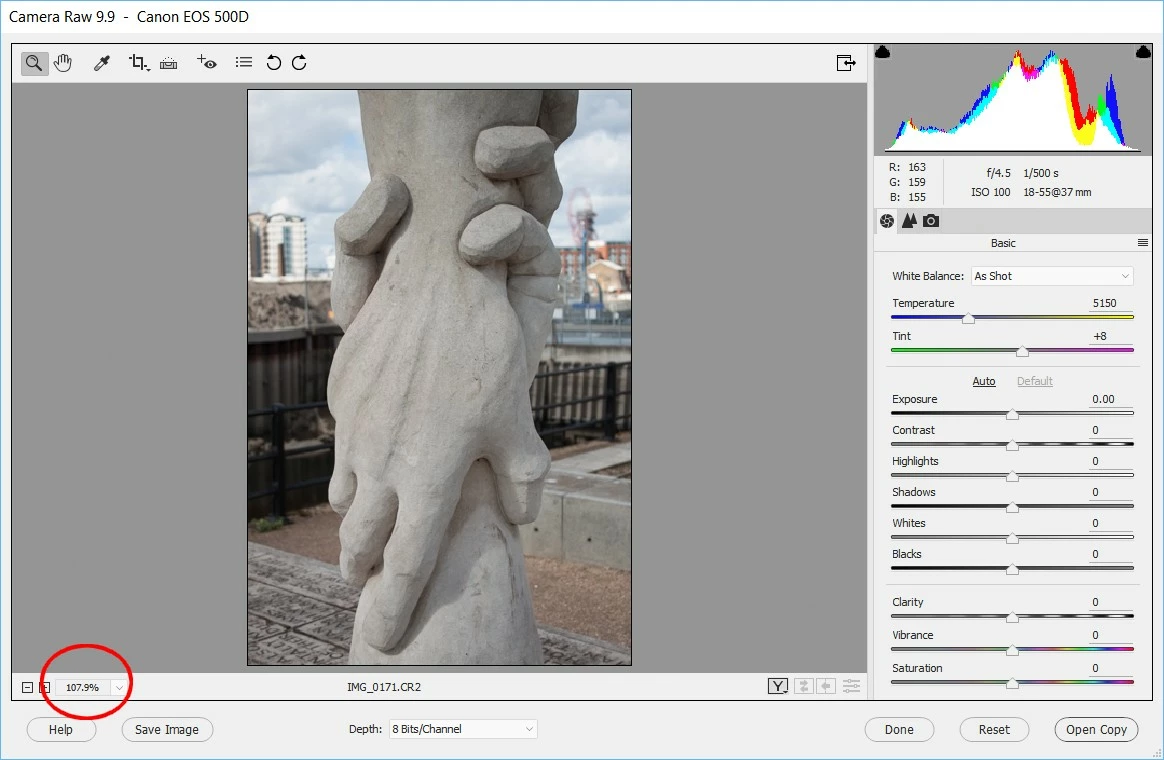
However when I open RAW files (and they are definitely CR2 RAW files with a file-size each of approx 19MB) they fill the screen, but the size shows as 107%, whereas I would expect something more like 25%.  I have tried full-screen and there's no difference.  I have also done a full install and reinstall of the program and again, no difference .

Help > About plug-in > Camera RAW shows there is only one instance of Camera RAW installed.

Does anyone know what may have gone wrong, please, and how I might correct it

Thanks

Philip
    This topic has been closed for replies.
    Correct answer Jeff Arola

    Hello

    Thank you for your suggestion,  However when I hold down the Shift+Ctrl+Alt keys and then go to File>Open and click on one of the cr2 files nothing happens.  It won't let me select a CR2 file and this dialog box doesn't appear.

    I wonder if there might be another way of resetting the camera raw preferences?
    Many thanks

    Philip


    Try File>Open, click on a cr2 file in the Open dialog, press Shift+Ctrl+Alt and then press the Open button

    1 reply

    MichelBParis
    Legend
    March 22, 2017

    That would happen if you have used the crop tool before.

    Click on the crop tool to make the whole image show, then outside of the image to remove the crop.

    philipdp
    philipdpAuthor
    Participating Frequently
    March 22, 2017

    Many thanks for such a quick reply.  Unfortunately all my RAW images are uncropped - I've tried your suggestion with several of them just to make doubly sure - so I'm afraid this hasn't solved it.

    Regards

    Philip

    John Waller
    Community Expert
    Community Expert
    March 22, 2017

    Can you provide a link to one of your Raw files (e.g. Dropbox) so we can download it and try to open it at our end?