



SparkyzFan2
Participant
December 25, 2020
Answered

Can I make a gradient color stop use the foreground or background option?

  • December 25, 2020
  • 3 replies
  • 2173 views

How do I make a gradient with color stops that would use the foreground or background colors instead of a particular color?  I know there are some preset gradients that use foreground and background colors, but, would like to create my own.  For instance, edit the metal gradient and instead of having a "gold" gradient have the gradient be the foreground color? I am using PSE 2021 on a Mac.
This topic has been closed for replies.
Correct answer SparkyzFan2

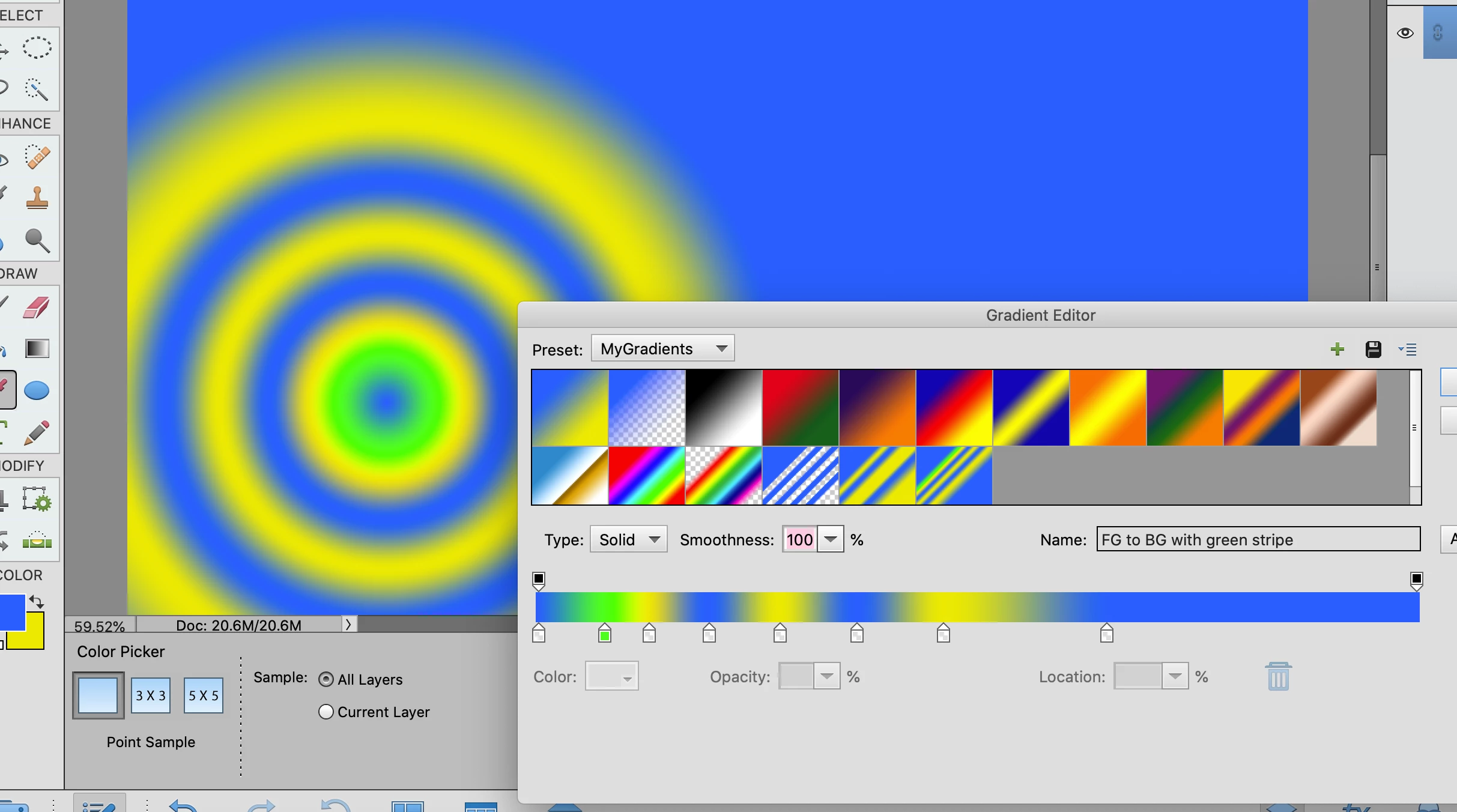
I knew about the foreground to background gradient in the default panel, but, when I tried to add a stop it was just a color stop not a background or foreground stop.  Well, I finally figured out, if i click on the forground stop and add a stop it will be a foreground stop.  If I click on the background stop my added stop will be a background stop.  in the screenshot below there is one "dedicated color" color stop that is green and all the rest of the stops are foreground or background stops. @Greg_S.  Thanx for helping me solve my own question! 


3 replies

Greg_S.
Community Expert
Community Expert
December 26, 2020
  1. Choose your foreground and background colors
  2. Select the first preset (Name: Foreground to Background)
  3. The resulting gradient uses your colors. 
  4. You can then save the preset with a new name if you wish.


Greg_S.
Community Expert
Community Expert
December 26, 2020

If you only want one of the colors to be in the gradient, in other words foreground to transparent, use the second icon.

If you want to use the background color, instead, before you open the grandient tool, press the keyboard shortcut X and the background/foreground colors are switched.

SparkyzFan2
SparkyzFan2AuthorCorrect answer
Participant
December 27, 2020

I knew about the foreground to background gradient in the default panel, but, when I tried to add a stop it was just a color stop not a background or foreground stop.  Well, I finally figured out, if i click on the forground stop and add a stop it will be a foreground stop.  If I click on the background stop my added stop will be a background stop.  in the screenshot below there is one "dedicated color" color stop that is green and all the rest of the stops are foreground or background stops. @Greg_S.  Thanx for helping me solve my own question! 


SparkyzFan2
Participant
December 26, 2020

@Greg_S. thanx for replying.  It is hard to know how to explain what I want to do.  I would like the gradient I make to use the foreground or background color automatically without me having to change the colors of the stops.  I was hunting a way to tell the color stop to always use the forground color or always use the background color.  The color stop itself would have the little checkerboard pattern inside it like the preloaded "foreground to background" gradient does.

Greg_S.
Community Expert
Community Expert
December 25, 2020
  1. Select the color stop you wish to change
  2. Click on the Color button and
  3. The Color Picker box will open;
  4. Hover your mouse over the foreground/background tools in the toolbox. The cursor will change to an eyedropper and you can click on the foreground or background color.  This will change the color of the gradient stop.
  5. You can then save your new gradient by clicking on the Add to Preset button.

Your custom preset will be added to the gradient panel.