Toorbul
Participant
March 19, 2025
Answered

CAN SMART TAGS BE DISABLED IN ELEMENTS ORGANISER

  • March 19, 2025
  • 1 reply
  • 243 views

I have a mixed bag of photos to import to Elements Organiser

Newer ones from digiral cameras have relevant Meta data

filed from older digital cameras have limited meta data

Many of the files are of scanned photos so no data

My preference is to rely on manually added tags for consistency & not have todeal with smart tags

can i set it up so smart tags is disabled from the outset

Cheers

Ken M

    Correct answer Greg_S.

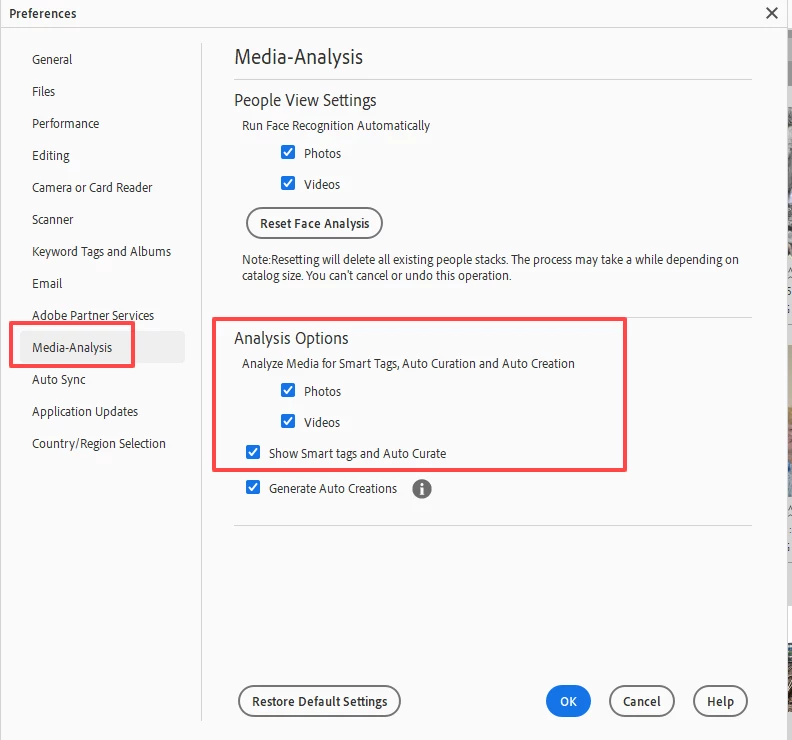
    You can turn it off in Preferences.  What version of Elements do you have?   Here is a screenshot of Elements 2025.  In earlier versions, the options may be slightly different.


    While I understand your desire to tag manually, there is really no need to turn off smart tags.  They are entirely hidden from view and, frankly, I find them to be quite useful at times.  In fact, I have generally stopped keyword tagging my photos entirely.

    1 reply

    Greg_S.
    Community Expert
    Greg_S.Community ExpertCorrect answer
    Community Expert
    March 19, 2025

    You can turn it off in Preferences.  What version of Elements do you have?   Here is a screenshot of Elements 2025.  In earlier versions, the options may be slightly different.


    While I understand your desire to tag manually, there is really no need to turn off smart tags.  They are entirely hidden from view and, frankly, I find them to be quite useful at times.  In fact, I have generally stopped keyword tagging my photos entirely.

    Toorbul
    ToorbulAuthor
    Participant
    March 19, 2025

    Greg,thanks for quick & positive response

    I might look to switch off for initial importation of "old stuff" and then switch it on for new imports


    cheers

    Ken M

    kglad
    Community Expert
    Community Expert
    March 19, 2025

    in the future, to find the best place to post your message, use the list here, https://community.adobe.com/

    p.s. i don't think the adobe website, and forums in particular, are easy to navigate, so don't spend a lot of time searching that forum list. do your best and we'll move the post (like this one has already been moved) if it helps you get responses.


    <"moved from using the community">