Participant
December 21, 2020
Answered

Can't access photos

  • December 21, 2020
  • 3 replies
  • 597 views

Hi,

I managed to lose access to my photos in Elements.  The list of folders appears but when I click, it says no media available, clear filter and try again.

I went further down on the list, click on This PC and C drive....it says no filters imported into Organizer.  To add, r click on folder and select import media.

I did this but get a message saying 0 media files skipped because already present in catalog or not supplied.  I am tearing my hair out.  HELP!!!!!! 
This topic has been closed for replies.
Correct answer Somya_Agarwal

Hi,

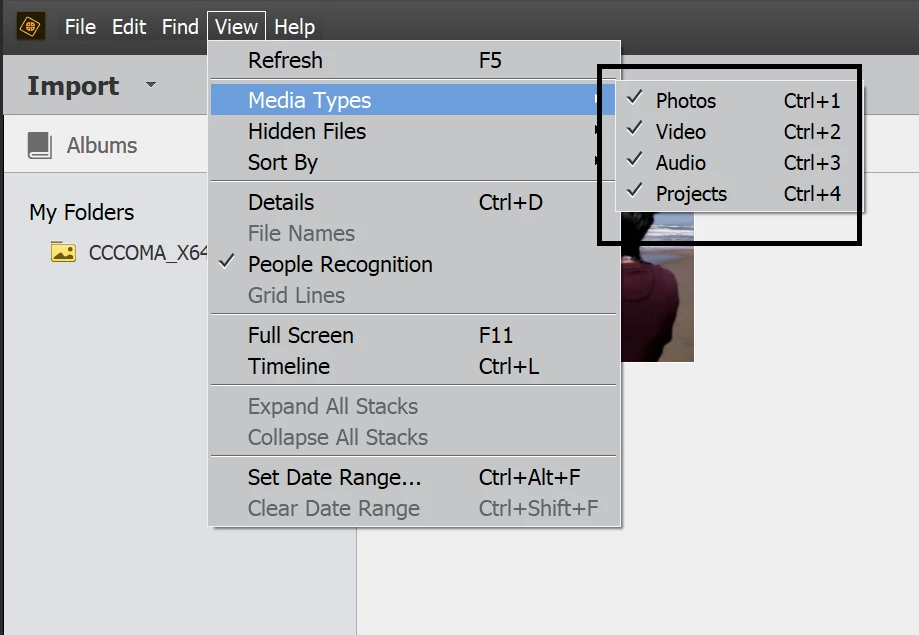
Can you go to View->Media Types, and see that 'Photos' is 'checked'?

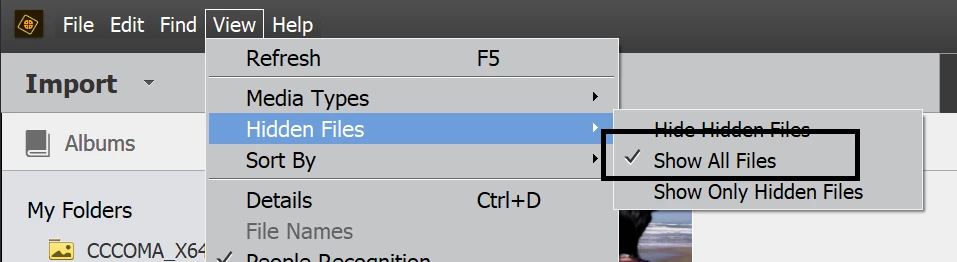
Also, go to View->Hidden Files, and see that 'Show all Files' is checked?


Does this resolve your problem?


Thanks!

3 replies

Greg_S.
Community Expert
Community Expert
July 3, 2023

@marciaa94625813, please show us a screenshot of what you are seeing, and a more detailed description of your problem. 

Participant
July 3, 2023

it is just advertisements for me to buy this product which i already bought


Somya_AgarwalCorrect answer
Adobe Employee
December 22, 2020

Hi,

Can you go to View->Media Types, and see that 'Photos' is 'checked'?

Also, go to View->Hidden Files, and see that 'Show all Files' is checked?


Does this resolve your problem?


Thanks!