SurferAl
Known Participant
January 1, 2018
Question

Can't Draw Black Line (Result is Feathered)

  • January 1, 2018
  • 3 replies
  • 706 views

I just want to draw a black line, but this is the kind of thing I get:
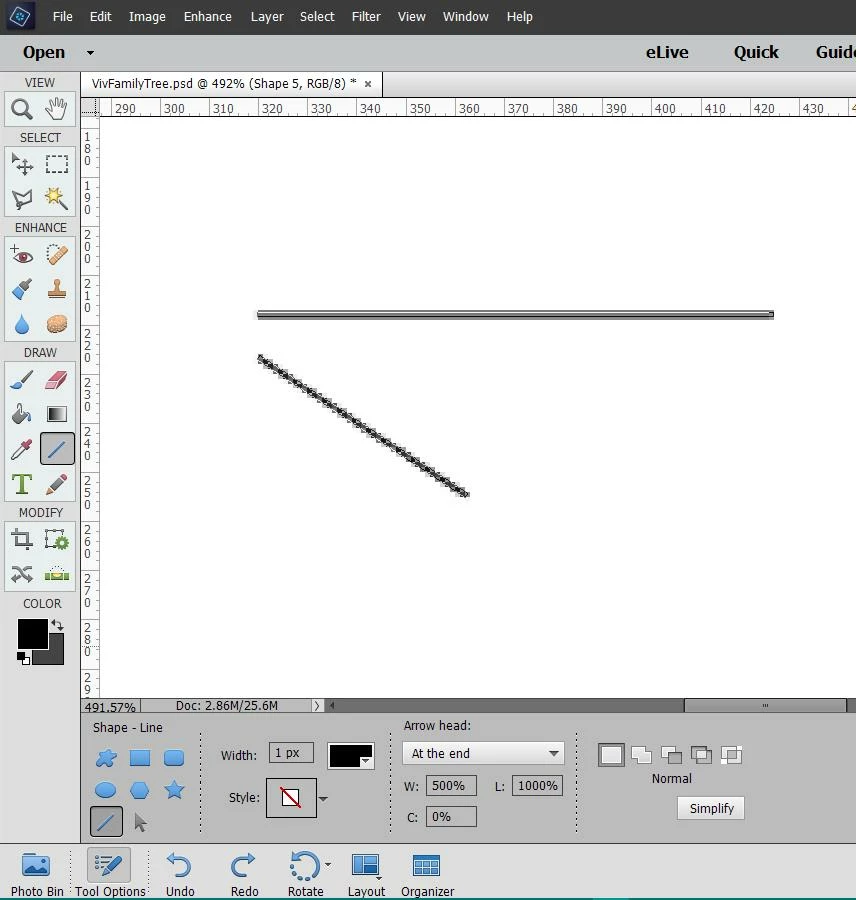
How do I fix that?

Thanks.

    This topic has been closed for replies.

    3 replies

    Inspiring
    January 2, 2018

    Try using the Pencil tool instead.

    To draw a straight perfectly horizontal or vertical line, click the start point, hold down Shift, and draw.

    I tried this with Pencil size 1px and got none of the gray like in your example. However it might just be that it worked with my particular file dimensions  (2400 x 3000 px, resolution 300).

    What are these dimensions in your file?

    Inspiring
    January 2, 2018

    I noticed your file is viewed at 492%.

    I created a blank file, set the view at that percentage, drew out a 1px line like yours, and got the same jagged look:

    However when viewed at 100% the line is sharp with no jaggies, and it also prints with no jaggies.

    I've seen this happen many times with other shapes and other tools such as Brush and Text, where the file is viewed at other than 100%.

    Could this be what you are seeing?

    SurferAl
    SurferAlAuthor
    Known Participant
    January 2, 2018

    Thanks, but that isn't it. Even viewed at 100%, the line has gray parts.

    hatstead
    Inspiring
    January 1, 2018

    Try the brush tool, using a hard brush.

    Left click a start point, then hold down the shift key, then left click at the end point.