

Participant
April 20, 2021
質問

Can't Figure Out How to Change This Setting to Inches

  • April 20, 2021
  • 返信数 1.
  • 393 ビュー

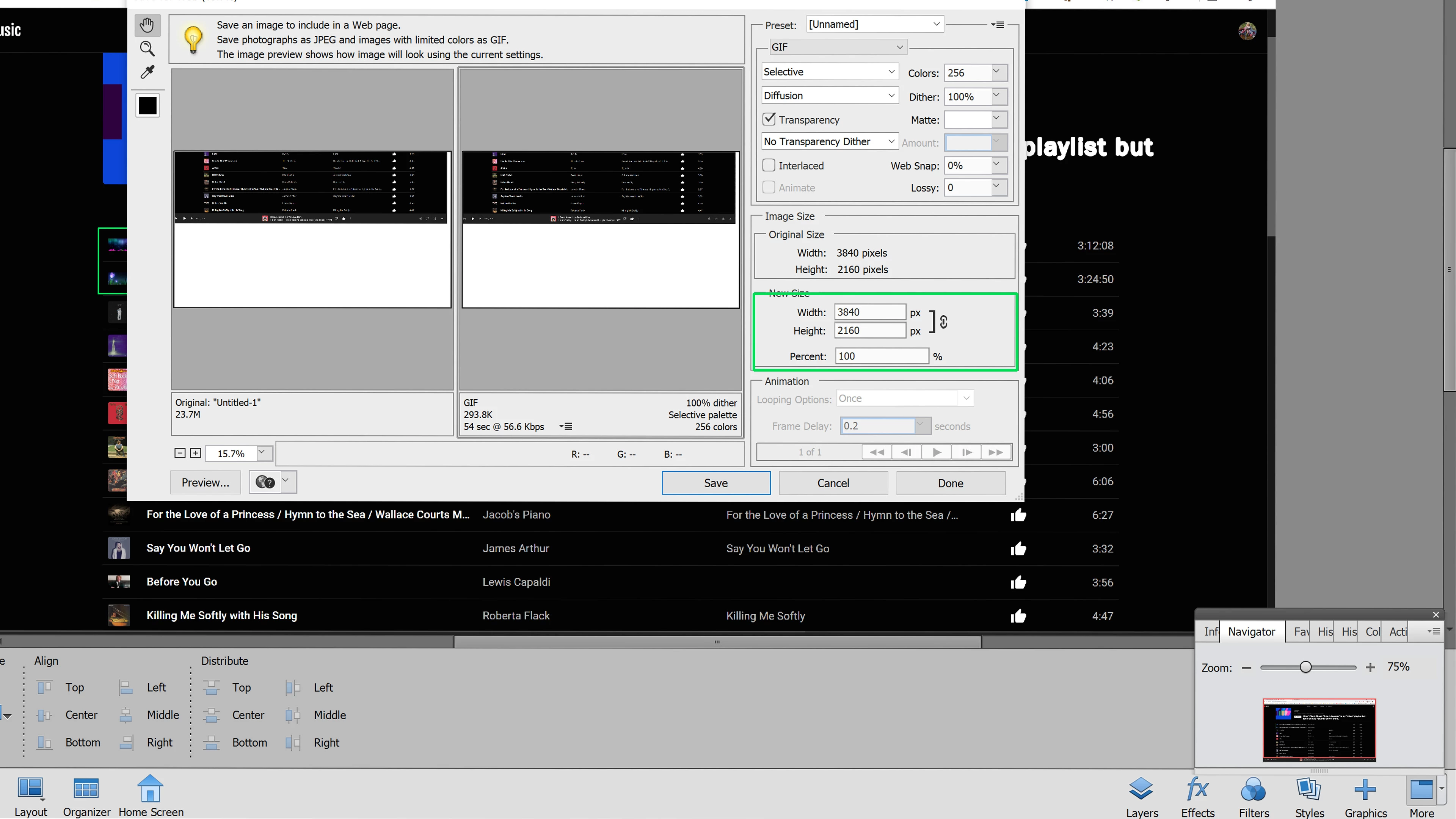
It can't be this hard!  Area of concern is outlined in green.  How do I change this to inches?  Thanks!
このトピックへの返信は締め切られました。

返信数 1

Phil Pickering
Legend
April 20, 2021

Hi,


You are using the Save for Web feature which, as its name suggests, is specifically geared-up for saving images for use on the Web. As such, the Image Size units of measurement in the Save for Web dialog window are solely for pixels, as that is how images are measured on-screen.


If you want to resize your image using inches as the unit of measurement you will need to go to Image > Resize > Image Size... In the Image Size dialog window that appears you will be able use the Document Size section to enter your required width and height in inches. (Use the drop-down menu to choose Inches if another unit of measurement is already pre-selected.)

Sawyerrk作成者
Participant
April 22, 2021

Thank you.  I upgraded to the 2021 version from v9 because Windows 10 won't run v9, so it's been several iterations and in v9 this was achieved by the steps I mentioned in my original post.  I had the option of inches or pixels for saving for web.
