Participant
May 1, 2024
Answered

Can't get Contact Sheet II to work in PE 2024

  • May 1, 2024
  • 2 replies
  • 1869 views

I'm working on a MacBook Air/M1 processor/Sonoma 14.4.1. When I originally installed PE2024 (Dec 2023) I could make contact sheets without a problem up until about a month ago. I tried to find the Contact Sheets Preferences to trash it (as suggested in another community discussion thread) but haven't been able to so I uninstalled PE and reinstalled a fresh copy of PE 2024. Still no luck. Please HELP!!
This topic has been closed for replies.
Correct answer Jeff Arola

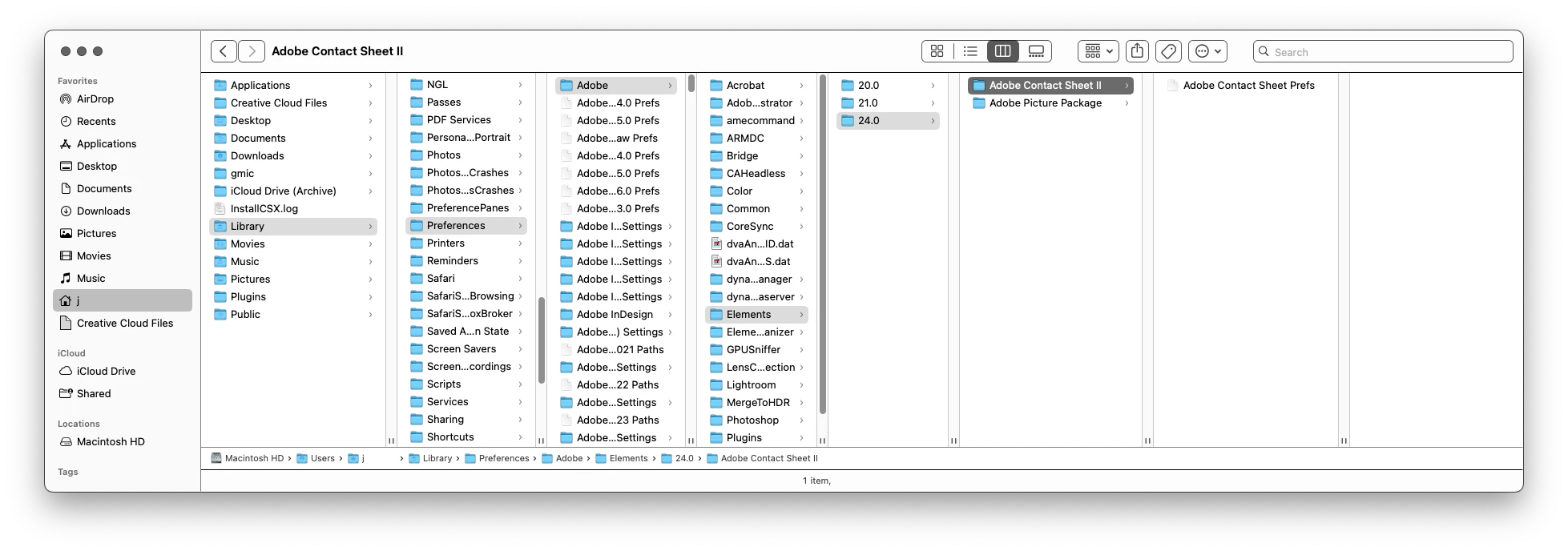
The Contact Sheet II preferences are in your User folder which is hidden by default on Macs

(on Windows as well)

Macintosh HD/Users/UserName/Library/Preferences/Adobe/Elements/24.0/Adobe Contact Sheet II

then trash the

Adobe Contact Sheet Prefs


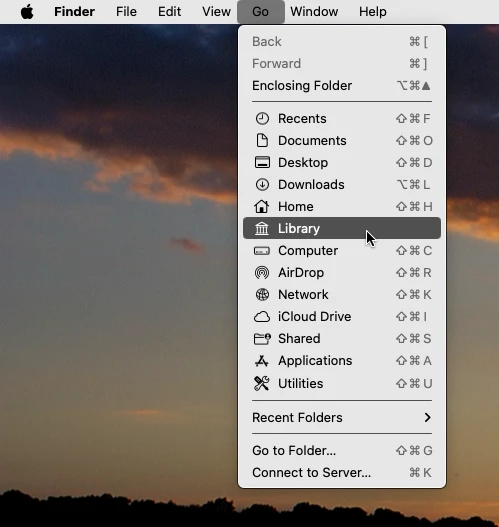
An easy way to get there is click on your desktop then click Go and while pressing the Option key

you should see Library, which is your User Library.


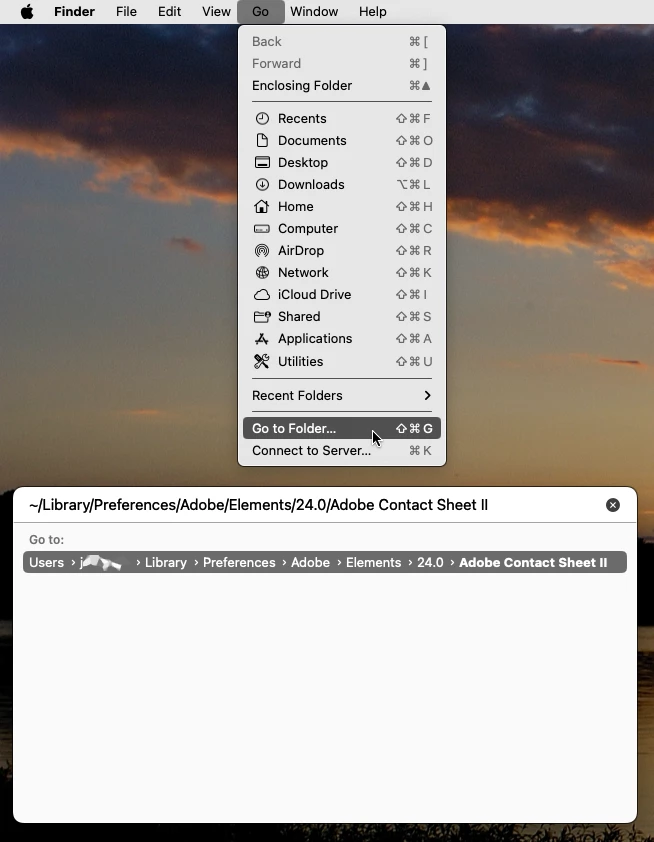
Another way is to click on your desktop, then in the Go menu click Go to Folder and paste

~/Library/Preferences/Adobe/Elements/24.0/Adobe Contact Sheet II


2 replies

Jeff Arola
Community Expert
Jeff ArolaCommunity ExpertCorrect answer
Community Expert
May 2, 2024

The Contact Sheet II preferences are in your User folder which is hidden by default on Macs

(on Windows as well)

Macintosh HD/Users/UserName/Library/Preferences/Adobe/Elements/24.0/Adobe Contact Sheet II

then trash the

Adobe Contact Sheet Prefs


An easy way to get there is click on your desktop then click Go and while pressing the Option key

you should see Library, which is your User Library.


Another way is to click on your desktop, then in the Go menu click Go to Folder and paste

~/Library/Preferences/Adobe/Elements/24.0/Adobe Contact Sheet II


Participant
May 2, 2024

Thank you both so much!  I FINALLY was able to trash the preferences and get the Contact Sheet II option to work. I also appreciate the first suggestion of creating my own contact sheet.

hatstead
Inspiring
May 2, 2024

One can do it manually. 

1. Open the Editor, Advanced tab.

2. Go to File>new> blank file, and set the dimensions according to your paper stock. For resolution, it is desirable to have it in the 240-300 px/in range. Ideally the picture files should be in this range as well. If they are not, you can batch process multiple files via File>Process multiple files in order to adjust the resolution.

3. Do the math, and crop your pictures so that they will fit on the canvas (from step #2)

4. Go to File>place and point to your pictures, and place. Each one will come in on a separate layer, and you arrange them to suit and make minor size adjustments with the corner handles.

5. It sounds more complicated that it is, but you have 100% control of the process.

Participant
May 2, 2024

This process is not a batch process, is it? I can only place one image at a time which is going to be onerous when I'm dealing with 100 images or more.