
Participant
May 10, 2017
Question

Can't Install PE 9. What does this message mean?

  • May 10, 2017
  • 1 reply
  • 273 views

I've been using PE 9, but recently the drop down menus were all empty, and the Organizer was unreadable. So, I reinstalled Win 10, and tried to reinstall PE 9.

It crashed near the end of the installation, and gave me this error message.

C:\WINDOWS\Installer\{007F77............. AF632)  contains
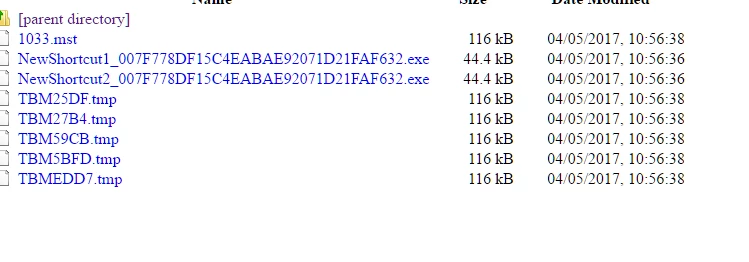
I'm lost

Thanks

John

    This topic has been closed for replies.

    1 reply

    John T Smith
    Community Expert
    Community Expert
    May 10, 2017

    An idea that MAY work to install and/or run old programs in Windows 10... works for some, not for others

    -RIGHT click the program icon or EXE and select a compatibility mode in the pop up option window

    -or Run as Administrator http://forums.adobe.com/thread/969395 to assign FULL Windows permissions may help... says Encore, but sometimes required for ALL Adobe programs (this is NOT the same as using an Administrator account)

    -or more on permissions https://forums.adobe.com/thread/2293598

    NOTE - Win10 anniversary update version 1607 has caused MAJOR problems with old programs, so the above may not work

    -Notice http://www.computerworld.com/article/3157369/windows-pcs/new-windows-10-build-is-a-monster-update.html

    killinvyAuthor
    Participant
    May 12, 2017

    Thank you, John T Smith

    Changing permissions and running as an adminstrator didn't help. I managed to get into C:\windows\installer (it's a hidden system file). I deleted 1033.mst and the download proceeded without  a problem.

    But, Organizer is still a mess, and all  the drop down menus in Edit open, but are blank. As you say some of the Win 10 update are horrors.  I did wonder whether PE 9 no longer runs in Win 10 (It did until a couple of weeks ago), but I see Organizer/Editor problems like mine from users of more recent editions of PE,

    Best wishes

    John