
Known Participant
September 9, 2022
Question

Can't Reinstall Elements 2022, Windows 11, HP laptop

  • September 9, 2022
  • 4 replies
  • 1081 views

I removed Photoshop Elements from my computer and want to reinstall it.  I get an error message. 
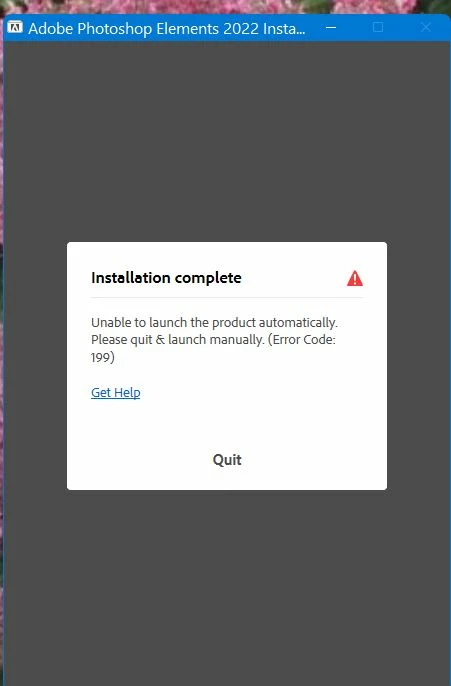
I tried restarting my computer which didn't help.  Tried starting application manually and that didn't work either. 
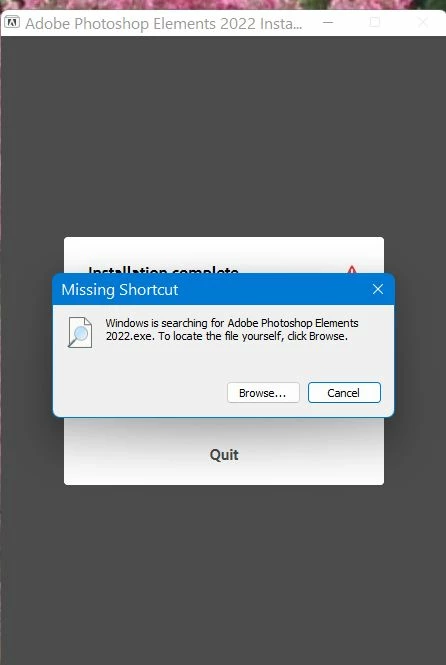
I've successfully installed this program before but uninstalled it to get a clean copy so I could import all of my Pictures to it. I didn't even get to the point where I needed to enter my serial number.


Thanks.

Patricia Empson

This topic has been closed for replies.

4 replies

Greg_S.
Community Expert
Community Expert
September 11, 2022

Try contacting Elements support. You can start a chat session by clicking on the blue Contact Us button under the Help & Support menu at Adobe.com. Or you can contact Support by telephone using the numbers listed here: https://helpx.adobe.com/contact/phone.html.  Hours of operation outside the US are limited (and shown in the telephone link).  With your permission, Support can take control of your machine and figure out the problem. 

patetcAuthor
Known Participant
September 11, 2022

Thanks but I was so frustrated that I have reset my laptop and will start over.

Thanks again.

Pat

Greg_S.
Community Expert
Community Expert
September 10, 2022

OK.  There are a couple of options for you, but I would try downloading from the link I provided you earlier.  Otherwise, to get the installation from your DVD, you may have to install the Adobe Creative Cloud desktop application.  The download from the link does not require that.

patetcAuthor
Known Participant
September 11, 2022

I tried the link you sent but still can't install PSE 2022. I've tried everything but nothing works.  I get error message 501. 

Greg_S.
Community Expert
Community Expert
September 10, 2022

How did you uninstall the program?  If you have the program files from the Editor but not the Organizer, something is seriously wrong.  I think I would try to use a program cleaner to get rid of all earlier traces of the program and then start the installation again.  You can download Elements 2022 from this link.


BTW, did you purchase the program from Adobe or the MS Store?  Or did it come already loaded with your computer?

patetcAuthor
Known Participant
September 10, 2022

I purchased the program from Best Buy. I had installed it and it was working just fine. Now I can't install it from the original CD.


Pat

Greg_S.
Community Expert
Community Expert
September 9, 2022

Look in the C:\Program Files\Adobe\Photoshop Elements 2022 directory, do you see a file named PhotoshopElementsEditor.exe.  What happens if you double-click it?


Also look in the C:\Program Files\Adobe\Elements 2022 Organizer folder and find the file named PhotoshopElementsOrganizer.exe.  If you double-click on it, does the Organizer open?


And although I suspect you already know this, make sure that file extensions are displayed in Windows File Explorer and that you are not misled by the colored folder icons that Adobe uses rather than the standard yellow folder icons.

patetcAuthor
Known Participant
September 10, 2022

"Look in the C:\Program Files\Adobe\Photoshop Elements 2022 directory, do you see a file named PhotoshopElementsEditor.exe.  What happens if you double-click it?"

Nothing

"Also look in the C:\Program Files\Adobe\Elements 2022 Organizer folder and find the file named PhotoshopElementsOrganizer.exe.  If you double-click on it, does the Organizer open?"


No, the organizer is not showing up anywhere.

Would it help if I downloaded the program from the website and installed it?


Pat

Patetc@gmail.com