Participant
November 13, 2016
Question

Can't use "whiten teeth" tool

  • November 13, 2016
  • 3 replies
  • 1660 views

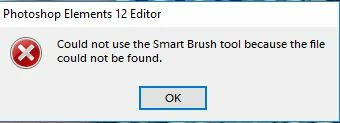
I am using PSE 12. When I try the Whiten Teeth button in any of the three edit types I get an eror message saying "Could not use the Smart Brush tool because the file could not be found". What do I do now?
    This topic has been closed for replies.

    3 replies

    Inspiring
    November 24, 2016

    If your example is teeth with a yellowish tint, try his alternate method:

    - Select and feather teeth 1 or 2 px.

    - Enhance > Adjust Color > Hue/Saturation, or add a Hue/Saturation adjustment layer.

    - Choose Yellows from menu.

    - Lower Saturation to remove yellow.

    - Optionally increase Lightness.

    Here I moved Saturation all the way left and changed Lightness to +50.

    Adobe Employee
    November 16, 2016

    Hi Mark Bender,

    Do you have following files present :

    • pearly whites.psd
    • pearly whites.metadata.xml
    • pearly whites.thumbnail.jpg

    at location

    C:\ProgramData\Adobe\Photoshop Elements\12.0\Photo Creations\adjustment layers                          (On Win).

    /library/Application Support/Adobe Photoshop Elements/12.0/Photo Creations\adjustment layers          (On MAC).

    If these files are not present, please let me know. I will share the files with you.

    Thanks,

    Rupali

    kram33Author
    Participant
    November 16, 2016

    Hi Rupali,

    The folder to which you referred me is empty! So I am probably missing other “stuff” as well. I would appreciate your sending me the files you mentioned as well as any others that should be in the folder.

    Many thanks!

    Mark

    Adobe Employee
    November 17, 2016

    Hi Mark,

    As your folder is empty, it would be better to reinstall the application.

    So, please reinstall your application and let me know if you face any issue while reinstalling.

    Thanks,

    Rupali

    mytaxsite
    Inspiring
    November 13, 2016

    Perhaps stick to the Quick mode.  Or view this video if you need guidance how to do it correctly:

    PSE12 is the same as in this video so don't worry about it.

    kram33Author
    Participant
    November 15, 2016

    Thx, but as I said in my original post I get an error message when I try to

    use the whiten teeth tool.

    On Sunday, November 13, 2016, mytaxsite.co.uk <forums_noreply@adobe.com>