Known Participant
December 7, 2022
Answered

Can you download more animated overlays/elements?

  • December 7, 2022
  • 5 replies
  • 1244 views

Can you download more animated overlays/elements?  Or there isn't anymore for elements?  Thanks

This topic has been closed for replies.
Correct answer Greg_S.

You cannot use an mp4 video file as an overlay in Photoshop Elements, but you may be able to do so in Premiere Elements, if the file has an alpha (transparency) channel.  (The Elements animated overlays can also be saved as mp4 files.)  As I have already indicated, an animated overlay consists of a series of frames (video) or layers (gif).  Each frame or layer has a subject, such as falling snow or leaves or bursting fireworks.   This subject has a transparent background through which the underlying image shows through.  Each frame or layer changes the position of the subject, and when they are displayed in quick succession, they have the appearance of movement or animation.  Here is a screenshot of the Elements blue butterfly overlay on a white background.  It comprises over 100 layers.
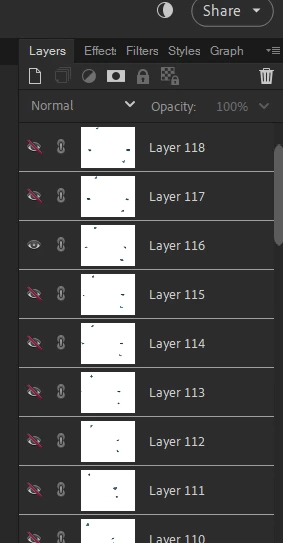


Each layer, originally starts with the background image and another layer sitting over it on a transparent layer.  The two layers are then flattened or combined.  A new set of layers is then created, using the background image and the transparent ovelay - with the overlay moved or changed e.g. the autumn leaf drops down and/or turns.  This second set of layers is then flattened or combined.  And so on and so on . . . .


I don't know what else to tell you without you being more specific as to what you want to do or create.


5 replies

Greg_S.
Community Expert
Community Expert
January 31, 2024

@Michael350452272mzc said:  can i use photoshop to make the layes i have just made an mp4 file of transperent image all put together in photoshop cs6

Are you asking about Photoshop CC (or CS6) or Photoshop Elements or Premiere Elements?  If you want to attach the mp4 file to your post or upload it to a sharing site if it is too large to attach here, I may be able to answer your question.  If you are attaching an MP4 file here, you should zip it first.


And a parsing error generally means that the file format is not supported by the program.

Greg_S.
Community Expert
Greg_S.Community ExpertCorrect answer
Community Expert
January 30, 2024

You cannot use an mp4 video file as an overlay in Photoshop Elements, but you may be able to do so in Premiere Elements, if the file has an alpha (transparency) channel.  (The Elements animated overlays can also be saved as mp4 files.)  As I have already indicated, an animated overlay consists of a series of frames (video) or layers (gif).  Each frame or layer has a subject, such as falling snow or leaves or bursting fireworks.   This subject has a transparent background through which the underlying image shows through.  Each frame or layer changes the position of the subject, and when they are displayed in quick succession, they have the appearance of movement or animation.  Here is a screenshot of the Elements blue butterfly overlay on a white background.  It comprises over 100 layers.


Each layer, originally starts with the background image and another layer sitting over it on a transparent layer.  The two layers are then flattened or combined.  A new set of layers is then created, using the background image and the transparent ovelay - with the overlay moved or changed e.g. the autumn leaf drops down and/or turns.  This second set of layers is then flattened or combined.  And so on and so on . . . .


I don't know what else to tell you without you being more specific as to what you want to do or create.


Participating Frequently
January 31, 2024

thank you will study the message and try to workouthow to do this as a chalange again thank you

Participating Frequently
January 31, 2024

nou can not as i have premier elements


Greg_S.
Community Expert
Community Expert
January 30, 2024

@Michael350452272mzc, an animated overlay results in an animated gif which can be made in Photoshop Elements using layers with transparencies.  Here is an example of a gif I made in Elements:


And here is a screenshot of the file that was used to create it with about 20 layers.


Once the layers have been created, you use the File>Save for Web dialog to create the animated gif file.

Participating Frequently
January 30, 2024

thank you for your reply  as a very big novice  with photoshop software  iam at a loss here  i am just used to useing simple gif software  but thank you   michael

Participating Frequently
January 30, 2024

i have tryed downloading some anamiated overlays only to find thery are mp4 files but can not load them into elements due to no parser what ever that is   no idea did a web search on more information on it with no luck i went looking for some software to make them but again no luck then i tryed looking to see what folder the overlays in the program are loaded not luck  as i was looking to see what type of files they are  any help information is much appericated   thank you

Greg_S.
Community Expert
Community Expert
December 7, 2022

. . . and just to make sure I didn't misunderstand your question, for those overlays that have a "blue ribbon" in the corner, you need to double-click on them to download the overlay for use on your computer.


debgramAuthor
Known Participant
December 7, 2022

Yes I knew of those that came with the software I just thought there might be more to buy.  I have an app on my phone that has more animated overlays than Elements does.  Thanks for your reply!

Greg_S.
Community Expert
Community Expert
December 7, 2022

You get all that are available for this feature. If you have a little skill and some patience, it is not too difficult to make your own. 

Participating Frequently
January 29, 2024

if i may ask how do you make your own what software do you need  thank you