November 7, 2020
Answered

Cannot get toolbar back to 2 columns in Elements 2020

  • November 7, 2020
  • 3 replies
  • 1011 views

I lost my bin and in trying to get it back I have reduced the toolbar to one column instead of 2 which reduces what I can see in the toolbar. How do I get the toolbar back to 2 columns?

    This topic has been closed for replies.
    Correct answer Greg_S.

    Do you remember what you were trying to do when the toolbox went to one column?


    I have no idea whether these suggestions will work, but try the following:


    • Press the Tab key to toggle the toolbox on and off
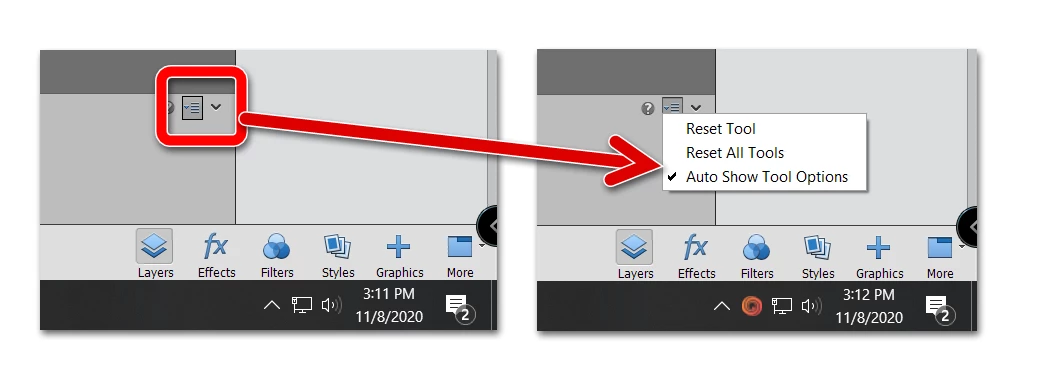
    • Reset all tools from the toolbin

    • Try resetting the preferences file. Go to Edit>Preferences>General tab and click the Reset Preferences on next launch button.

    3 replies

    Participant
    July 13, 2022

    In PSE 19: Under "Window" click on "Reset Panels".

    I found it by "trial and error"!

    Greg_S.
    Community Expert
    Greg_S.Community ExpertCorrect answer
    Community Expert
    November 8, 2020

    Do you remember what you were trying to do when the toolbox went to one column?


    I have no idea whether these suggestions will work, but try the following:


    • Press the Tab key to toggle the toolbox on and off
    • Reset all tools from the toolbin

    • Try resetting the preferences file. Go to Edit>Preferences>General tab and click the Reset Preferences on next launch button.
    November 11, 2020

    Thank you. I got it back!

    Greg_S.
    Community Expert
    Community Expert
    November 7, 2020

    It sounds like you are in the Quick mode rather than Expert mode:


    November 8, 2020

    No I am in expert mode.