Participant
November 15, 2025
Answered

CANNOT LOAD PHOTOSHOP ELEMENTS 2026

  • November 15, 2025
  • 5 replies
  • 492 views

I have been using PE 2026 since purchasing recently without any issues, but now I cannot load the program. I have uninstalled and reinstalled the program and I can use it once then when I try again I cannot load it again. Can anyone help with this problem please?  

Correct answer Greg_S.

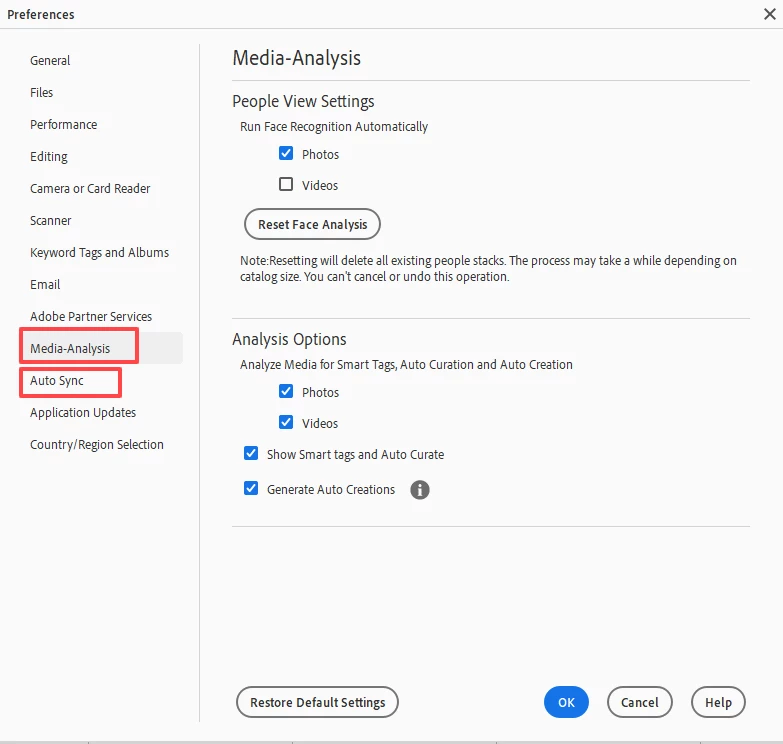
I understood that you could get the program to open at least once when you reinstalled it.  If you are able to do so, press Ctrl+K and the following dialog will appear:


 Click on the Media-Analysis and Auto sync tabs and uncheck all the boxes.


But it sounds to me like the problem is more difficult to diagnose.   So I suggest that you contact Adobe Support.


5 replies

Greg_S.
Community Expert
Greg_S.Community ExpertCorrect answer
Community Expert
November 17, 2025

I understood that you could get the program to open at least once when you reinstalled it.  If you are able to do so, press Ctrl+K and the following dialog will appear:


 Click on the Media-Analysis and Auto sync tabs and uncheck all the boxes.


But it sounds to me like the problem is more difficult to diagnose.   So I suggest that you contact Adobe Support.


DAVSAMP49Author
Participant
November 17, 2025
This appears to have done the trick and PE 2026 version 26.1 appears to be operating correctly. Thank you.
Participant
November 16, 2025

Zelfde probleem hier . Krijg gedurende ongeveer 1 minuut bericht ' de editor werkruimte van PSE laden ...'  en nadien niets meer . Ook al nieuwe installatie gedaan , werkt even en nadien weer zelfde probleem ..

JV24
Participant
January 27, 2026

Ik heb ook dat probleem met de 2026 versie. Hoe heb jij dit kunnen oplossen aub?

Greg_S.
Community Expert
Community Expert
November 16, 2025

@DAVSAMP49 said:  I have also re-installed PE 2025 but that doesn't work either and, in any case, takes up too much space on my hard drive, so I've uninstalled that again.


How much free space do you have on your hard drive?  That could be the problem.

Other possible issues:

  • Do you use the Organizer? If so, try turning of all media analysis in Edit>Preferences dialog.
  • Do you have Auto sync to the Elements Web turned on?  If so, try turning it off in the Preferences dialog.


If you are continuing to have problems, try contacting Elements support. You can start a chat session by going to the Contact Adobe Support page. (https://helpx.adobe.com/contact.html?rghtup=autoOpen) Make sure you are signed into your Adobe account and type Agent when the chat window opens. (If you use my link, the chat window should open automatically.)  With your permission, Support can take control of your computer and hopefully figure out the problem.

DAVSAMP49Author
Participant
November 16, 2025
Currently my C; drive has 95 GB of space. I also have approx 450 GB of space on my 😧 drive but as yet I have not been able to find a way to transfer that space to the C: Drive.

I appreciate your comments regrading Edit>Preferences .............. but where do I find that as I cannot load the prog. I have looked on the C: drive into the Program Files - then Adobe and PE Organiser but I don't know where to look for Edit>Preferences. Can you help with that please?
Glenn 8675309
Legend
November 15, 2025

have you reinstalled using the download in your adobe account?

DAVSAMP49Author
Participant
November 15, 2025
Yes, I have. I have also re-installed PE 2025 but that doesn't work either and, in any case, takes up too much space on my hard drive, so I've uninstalled that again. I have tried restarting my computer but that doesn't help. Also, I have downloaded the latest Graphics Nvidia Driver but that doesn't seem to be the issue. If I uninstall PE 2026 then reinstall from my adobe account, the program works.................... but if I close it then try to use it again it won't load. I just do not know what to do ...........I'm not really a technophile so am unsure how to tell if my computer is compatible - although it should be as I'm using Windows 11 with the latest updates.
Glenn 8675309
Legend
November 15, 2025

restart your computer.

DAVSAMP49Author
Participant
November 15, 2025

I've tried that but the program still will not load.