

Cannot Rename File in Elements Organizer
I've renamed many files within the Elements Organizer (version 18), but today I'm stuck. Previously, I had just renamed files by replacing the value in the Name field under Information in the Organizer window. For some reason, this stopped working today. I finally closed the Organizer, reopened it, and tried again. It worked the first time, but not thereafter. So instead, I used the Rename item in the File menu to rename the file (I think that's what Adobe tells you to use anyway). This works, but only if the filename you want is 30 characters or less. In fact, if your current filename is longer than that, it shows up truncated in the Rename field. So "Spiky red flower in Baltimore Canyon_P1130632.jpg" shows up like this:
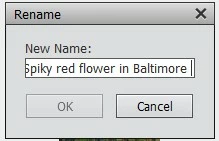
I've identified the flower (it's name is considerably longer than "Spiky red"), but cannot rename the file inside the Organizer, because it doesn’t come close to fitting in the Rename field. Is this a bug, or a feature (it’s hard to believe that this is intentional)? Or am I the only one seeing this behavior? Is there a workaround within the Organizer, or do I need to rename it outside the Organizer and then reconnect the file to the catalog?


 AdChoices