plantagenet
Participating Frequently
February 23, 2019
Answered

Cannot select Printer in Elements 2018

  • February 23, 2019
  • 1 reply
  • 878 views

When attempting to print an image I select HP Photosmart 8250, but Elements2018 always reverts to my default printer and will not let me print on the Photosmart.

Is there a way to force it to print to the printer I select?

Thanks.
This topic has been closed for replies.
Correct answer hatstead

plantagenet  wrote

When attempting to print an image I select HP Photosmart 8250, but Elements2018 always reverts to my default printer and will not let me print on the Photosmart.

Is there a way to force it to print to the printer I select?

Thanks.

Make sure that you have the latest driver for the printer. Check on the HP web site

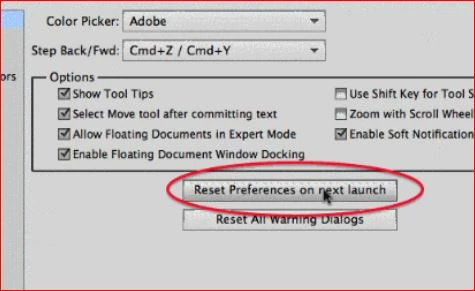
Open the Expert tab in Editor, and go to Edit>Preferences>General. Look for this:

Reset preferences, close the program, and launch. This may fix it.

1 reply

hatstead
hatsteadCorrect answer
Inspiring
February 23, 2019

plantagenet  wrote

When attempting to print an image I select HP Photosmart 8250, but Elements2018 always reverts to my default printer and will not let me print on the Photosmart.

Is there a way to force it to print to the printer I select?

Thanks.

Make sure that you have the latest driver for the printer. Check on the HP web site

Open the Expert tab in Editor, and go to Edit>Preferences>General. Look for this:

Reset preferences, close the program, and launch. This may fix it.

plantagenet
Participating Frequently
February 23, 2019

That did indeed fix it.

Thanks for your help.

hatstead
Inspiring
February 24, 2019

You're welcome. Glad to help.