3 replies

CoolBruno
Participant
November 10, 2024

I have the exact same problem. The build is not being updated. It is November 2024 and I am still on 24.0 and the updater is greyed out. Adobe has a bug with the updater.


Participant
September 9, 2024

I can't update Elements 2024 manually or automatically. Every time I open the program, I get a message that there is an update. I see that there are actually updates, but the program closes every time and reports

I have version Version Adobe Photoshop Elements: 24.0 (20230922.Git.master.31442ae) x64 and see that Elements system information states that I have Windows 10, but I have Windows 11 Pro.


I also get the message that I am missing a link to do the update and then that link cannot be found in the Microsoft store.

I have already done a clean installation once, but that does not solve this problem either.

Does anyone know how to solve this problem?

Or how can I contact Adobe?


Versie Adobe Photoshop Elements: 24.0 (20230922.Git.master.31442ae) x64
Besturingssysteem: Windows 10 64-bits
Versie: 10 of hoger
Systeemarchitectuur: Intel CPU-familie:6, Model:7, Stepping:2 met MMX, SSE-integer, SSE FP, SSE2, SSE3, SSE4.1, SSE4.2, AVX, AVX2, HyperThreading
Aantal fysieke processors: 16
Aantal logische processors: 24
Snelheid processor: 2496 MHz
Ingebouwd geheugen: 65144 MB
Beschikbaar geheugen: 33276 MB
Hoeveelheid beschikbaar geheugen voor Photoshop Elements: 59685 MB
Geheugen in gebruik door Photoshop Elements: 70 %
Status ACP.local:
- SDK-version: 1.34.1
- Status core-synchronisatie: Onbekend
- Core-synchronisate wordt uitgevoerd: Niet beschikbaar
- Minimale core-synchronisatie vereist: 4.3.4.2
ACPL-cache configureren: Niet beschikbaar
Blokgrootte van afbeelding: 1024 kB
Niveaus voor afbeeldingscache: 6
Lettertypevoorvertoning: Normaal
TextComposer: Latijn
Scherm: 1
Grenzen: boven= 0, links= 0, onder= 1440, rechts= 2560
Scherm: 2
Grenzen: boven= 0, links= 2560, onder= 1440, rechts= 5120
OpenGL-tekenen: Uitgeschakeld.
Type licentie: Onbeperkt
Serienummer: 91558892907631260577
Feature::Dummy Feature: OFF
Feature::GPULensBlur: ON
Feature::HEIFFormat: ON
Feature::CloudPSDSnapshotFiles: OFF
Feature::CloudDocs: ON
Feature::CloudDocsEnableFaultInjection: OFF
Feature::CloudDocsFailAll: ON
Feature::CloudDocFolders: ON
Feature::Frame Tool: ON
Feature::AliasLayers: OFF
Toepassingsmap: C:\Program Files\Adobe\Photoshop Elements 2024\
Tijdelijk bestandspad: C:\Users\SJORSR~1.CHA\AppData\Local\Temp\
Werkgeheugen van Photoshop Elements heeft asynchrone I/O ingeschakeld
Werkvolume(s):
Start, 476,0G, 233,9G vrije schijfruimte
Map met vereiste plug-ins: C:\Program Files\Adobe\Photoshop Elements 2024\Required\Plug-Ins\
Primaire map voor plug-ins: C:\Program Files\Adobe\Photoshop Elements 2024\Plug-Ins\
Map voor extra plug-ins: niet ingesteld

Geïnstalleerde componenten:
ACE.dll ACE 2022/08/18-19:08:03 79.ce4174f 79.ce4174f
AdbePM.dll PatchMatch 0000/00/00-00:00:00 1. 1.
AdobeLinguistic.dll Adobe Linguisitc Library 10.0.0
AdobeOLS.dll Adobe Online Services 5.0
AdobeOwl.dll Adobe Owl 5.5.9
AdobePDFL.dll PDFL 2022/08/18-13:23:32 79.6c2661f 79.6c2661f
AdobePIP.dll Adobe Product Improvement Program 8.2.0.62
AdobeXMP.dll Adobe XMP Core 2022/08/16-18:02:43 79.171c27f 79.171c27f
AdobeXMPFiles.dll Adobe XMP Files 2022/08/16-18:02:43 79.171c27f 79.171c27f
adobe_caps.dll Adobe CAPS 10,0,0,8
AGM.dll AGM 2022/08/18-19:08:03 79.ce4174f 79.ce4174f
ahclient.dll AdobeHelp Dynamic Link Library 2.2.0.1
AIDE.dll AIDE 2022/08/19-19:10:17 79.d7ba922 79.d7ba922
amtlib.dll AMTLib (64 Bit) 11.0.0.39 1.000000
ARE.dll ARE 2022/08/18-19:08:03 79.ce4174f 79.ce4174f
AXE8SharedExpat.dll AXE8SharedExpat 2022/08/17-05:51:28 79.43e459d 79.43e459d
AXEDOMCore.dll AXEDOMCore 2022/08/17-05:51:28 79.43e459d 79.43e459d
Bib.dll BIB 2022/08/18-19:08:03 79.ce4174f 79.ce4174f
BIBUtils.dll BIBUtils 2022/08/18-19:08:03 79.ce4174f 79.ce4174f
boost_date_time.dll photoshopdva 11.1.0
boost_filesystem.dll photoshopdva 11.1.0
boost_signals.dll photoshopdva 11.1.0
boost_system.dll photoshopdva 11.1.0
boost_threads.dll photoshopdva 11.1.0
cast_api.dll Cast 1.0
cg.dll NVIDIA Cg Runtime 3.0.00007
cgGL.dll NVIDIA Cg Runtime 3.0.00007
CITThreading.dll Adobe CITThreading 2.1.0.1 2.1.0.1
CoolType.dll CoolType 2022/08/18-19:08:03 79.ce4174f 79.ce4174f
CRClient.dll Adobe Crash Reporter Client DLL 12.3.0.202306131643_44f1cd7
DirectML.dll DirectML Redistributable Library 1.8.2+220504-2016.1.dml-1.8.0de2b44
dunamis-ingest.dll
dvaaudiodevice.dll photoshopdva 11.1.0
dvacore.dll photoshopdva 11.1.0
dvamarshal.dll photoshopdva 11.1.0
dvamediatypes.dll photoshopdva 11.1.0
dvametadata.dll photoshopdva 11.1.0
dvametadataapi.dll photoshopdva 11.1.0
dvametadataui.dll photoshopdva 11.1.0
dvaplayer.dll photoshopdva 11.1.0
dvatransport.dll photoshopdva 11.1.0
dvaui.dll photoshopdva 11.1.0
dvaunittesting.dll photoshopdva 11.1.0
dynamiclink.dll photoshopdva 11.1.0
ems.dll Elements Organizer 24.0
ExtendScript.dll ExtendScript 2019/07/29-10:07:31 82.2 82.2
Eyeopener.dll Adobe Photoshop Editor 16.0
FaceDetector.dll FaceDetector 0000/00/00-00:00:00 2.0.1.1 2.0.1.1
HDPIM.dll HDPIM DLL 5.10.0.573
HUM.dll HUM DLL 5.10.0.573
icucnv69.dll International Components for Unicode Build 13.1.a82691a
icucnv71.dll International Components for Unicode Build 14.0.04ee3a5
icudt69.dll International Components for Unicode Build 13.1.a82691a
icuuc69.dll International Components for Unicode Build 13.1.a82691a
icuuc71.dll International Components for Unicode Build 14.0.04ee3a5
imslib.dll IMSLib DLL 10.0.0.48
JP2KLib.dll JP2KLib 2022/08/17-19:10:18 79.7f05fe0 79.7f05fe0
libcrypto-3-x64.dll The OpenSSL Toolkit 3.0.7
libeay32.dll The OpenSSL Toolkit 1.0.2zf
libifcoremd.dll Intel(r) Visual Fortran Compiler 10.0 (Update A)
libiomp5md.dll Intel(R) OpenMP* Runtime Library 5.0
libmmd.dll Intel(r) C Compiler, Intel(r) C++ Compiler, Intel(r) Fortran Compiler 12.0
libssl-3-x64.dll The OpenSSL Toolkit 3.0.7
LogSession.dll LogSession 8.2.0.62
mc_enc_mp4v.dll MainConcept® MPEG-4 Video Encoder Engine 10.6.19.4108
mc_mux_mp4.dll MainConcept® MP4 Multiplexer 10.6.19.5744
mediacoreif.dll photoshopdva 11.1.0
Microsoft.AI.MachineLearning.dll Microsoft® Windows® Operating System 1.13.20221021.1.b353e0b
mona.dll Adobe Photoshop Editor 16.0
MPS.dll MPS 2022/08/18-19:08:03 79.4e4cf9b 79.4e4cf9b
onnxruntime.dll Microsoft® Windows® Operating System 1.13.20221021.1.b353e0b
pdfsettings.dll Adobe PDFSettings 1.07
Photoshop.dll Adobe Photoshop Elements Editor 24.0
platform.DLL Adobe Help System 1, 0, 0, 1
Plugin.dll Adobe Photoshop Editor 16.1
PSArt.dll Adobe Photoshop Elements Editor 24.0
PSCloud.dll 1.0.0.1
PSViews.dll Adobe Photoshop Elements Editor 24.0
ScCore.dll ScCore 2019/07/29-10:07:31 82.2 82.2
seledit.dll Seledit 1.0
ssleay32.dll The OpenSSL Toolkit 1.0.2zf
svml_dispmd.dll Intel(r) C Compiler, Intel(r) C++ Compiler, Intel(r) Fortran Compiler 12.0
tbb.dll Intel(R) Threading Building Blocks for Windows 2020, 2, 2020, 0311
tbbmalloc.dll Intel(R) Threading Building Blocks for Windows 2020, 2, 2020, 0311
updaternotifications.dll Adobe Updater Notifications Library 10.0.0.1 (BuildVersion: 1.0; BuildDate: BUILDDATETIME) 10.0.0.1
VulcanControl.dll Vulcan Application Control Library 6.5.0.000
VulcanMessage5.dll Vulcan Message Library 6.5.0.000
WRServices.dll WRServices Thu Jan 07 2016 04:50:10 Build 0.21960 0.21960


Vereiste plug-ins:

Afbeelding rechttrekken 12.0.1
Afbeelding rechttrekken en uitsnijden 12.0.1
Andere wolken 16.1 (2015.1 x001 x003)
Arcering 16.1
Automatisch verdelen 12.0.1
Automatische schokreductie 24.0
Basreliëf 16.1
Beeldroman 13.0
BMP 24.0
Bol 24.0
Cameravervorming corrigeren 24.0
Chroom 16.1
CompuServe GIF 24.0
Conté crayon 16.1
Craquelure 16.1
Diepte geven 24.0
Donkere lijnen 16.1
Droog penseel 16.1
FastCore Routines 16.1 (2015.1 x001 x003)
Filigraan 16.1
Filmkorrel 16.1
Filter Figuurpakket 16.1 (2015.1 x001 x003)
Filter Foto's uitsnijden en rechttrekken 24.0
Filtergalerie 16.1
Fotokopie 16.1
Fresco 16.1
Geaccentueerde randen 16.1
Gebrandschilderd glas 16.1
Gemiddeld 16.1 (2015.1 x001 x003)
Gescheurde randen 16.1
Gezichtskenmerken aanpassen 24.0
Gips 16.1
Glas 16.1
Gloed onscherp 16.1
Golf 24.0
Grafische pen 16.1
Halftoonraster 16.1
Hoeklijn 16.1
Houtskool 16.1
Inktomtrek 16.1
Kleur halftoon 24.0
Kleurpotlood 16.1
Klodder 16.1
Kneep 24.0
Knipsel 16.1
Korrel 16.1
Krijt en houtskool 16.1
Kristal 24.0
Kronkel 24.0
Lappendeken 16.1
Matlab-bewerking 16.1 (2015.1 x001 x003)
Mezzotint 24.0
MMXCore-routines 16.1 (2015.1 x001 x003)
Mozaïektegels 16.1
Neon gloed 16.1
Oceaanrimpel 16.1
Ondersteuning van meerdere processors 16.1 (2015.1 x001 x003)
OnEdge 1, 0, 0, 1
Oplichtende rand 16.1
Opslaan voor web 24.0
Paletmes 16.1
Pen en inkt 13.0
Pixar 16.1 (2015.1 x001 x003)
Plastic 16.1
PNG 24.0
Pointilleren 24.0
Poolcoördinaten 24.0
Posterranden 16.1
Postpapier 16.1
Radiaal vaag 24.0
Rimpel 24.0
Ruw pastel 16.1
Schokreductie 24.0
Schuin 24.0
Scriptondersteuning 16.1
Slim vervagen 24.0
Solarisatie 16.1 (2015.1 x001 x003)
Spetters 16.1
Spons 16.1
Sproeilijn 16.1
Stempel 16.1
Stripverhaal 13.0
Structuurmaker 16.1
Sumi-e 16.1
Tegels 24.0
Uitvloeien 24.0
Vage lens 16.1
Verplaatsen 24.0
Vezels 24.0
Vlek 16.1
Voorbewerking 16.1
Waterkleur 16.1
Watermerk lezen 4.0
Waterpapier 16.1
WIA-ondersteuning 16.1 (2015.1 x001 x003)
Wind 24.0
Wolken 16.1 (2015.1 x001 x003)
ZigZag 24.0
Zon 24.0

Optionele plug-ins en plug-ins van derden: GEEN


Niet geladen insteekmodules: GEEN

Geïnstalleerde TWAIN-apparaten: GEEN

Glenn 8675309
Legend
September 9, 2024

Here is the problem:   You have to get support from the microsoft store.  They are responsible for support for your product- and updates, Adobe is not.    The version of PSE is slightly different in the MS store, no, I don't know what's different- I just know that users who purchase PSE from the MS Store report that is is a bit different. 

Participant
September 10, 2024

I am sorry but you dont understand the problem. Your comment has no sense. Ask first where I bought the Elements Software before you give this reaction. And read carefully the problems in this forum before you answer.

I bought and download Photoshop Elements 2024 directly from Adobe and Elements is giving the warning about the link with the Microsoft shop.


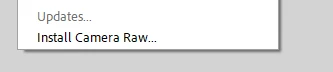
In the mean time I solved the problem. I go to Help and choosed Camera Raw Install and that install did work and after that install of Camera Raw I could also install the regular Updates from Elements 2024 Editor. Now I am up to date with the last version of Elements 2024 Editor. 

Glenn 8675309
Legend
May 4, 2024

You "can't go somewhere" to get the download.  Downloads are "pushed out" to users at different times.  If the updates is greyed out, as depicted in your posted image, a update may be available, but not for you, yet.   Not much you can do but wait and check every couple of days.


Participating Frequently
May 4, 2024

ok, thanks.


Glenn 8675309
Legend
May 4, 2024

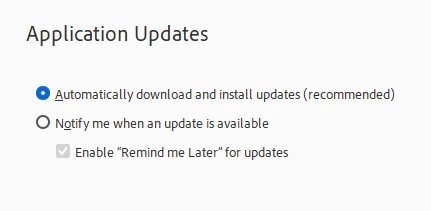
In your editor preference file for the editor (The preference file for organizer looks simliar, but is different) you can select what you see below, as I have.  I lterally do not concern myself with updates- this will happen when they do.