


cwicket
Participant
March 25, 2019
Answered

Cannot update PSE 2019 OSX
  • March 25, 2019
  • 2 replies
  • 3524 views

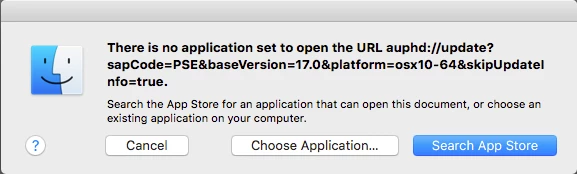
"There is no application set to open the URL auphd://update?sapCode=PSE&baseVersion=17.0&platform=osx10-64&skipUpdateInfo=true."

^Dialogue that comes up when trying to update or quit PSE editor.

Downloaded version of PSE 2019 OS X.

Changing default browser to Safari/Opera/Firefox/Chrome doesn't change anything.

Turning off any/all extensions on all of those browsers doesn't change anything.

Obviously, "Choose Application..." and "Search App Store" are not a solution.

OSX 10.13.6, latest versions of all browsers.
Correct answer cwicket

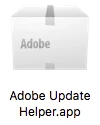
It is present.

After manually starting Adobe Update Helper, I was able skip the error message, successfully download, install, and launch the update.  Thanks for the clue!

2 replies

Participant
February 25, 2020

Could you please tell me where to find Adobe Update Helper.app and how manually starting it? Many thanks in advance

99jon
Legend
February 25, 2020

Are you using Mac OS? Are you being prompted to update? Ensure you are looking in the system library, not the user library


If you click Go on the top menu and choose go to folder it usually takes you to /Library/ and you can follow the path from there. The Adobe Update Helper app is usually inside the HDBox folder.


Macintosh HD⁩ ▸ ⁨Library⁩ ▸ ⁨Application Support⁩ ▸ ⁨Adobe⁩ ▸ ⁨Adobe Desktop Common⁩ ▸ ⁨HDBox⁩


Participant
February 9, 2021

I tried to follow that string, but don't have the Adobe Desktop Common folder. Suggestions?

Medha_Sharma
Adobe Employee
Adobe Employee
March 26, 2019

Hello,

We apologize for the inconvenience you had to face.

Could you please navigate to: /Library/Application Support/Adobe/Adobe Desktop Common/HDBox’ and confirm whether Adobe Update Helper application is present at the aforementioned location?

Thanks,

Medha

cwicket
cwicketAuthorCorrect answer
Participant
March 27, 2019

It is present.

After manually starting Adobe Update Helper, I was able skip the error message, successfully download, install, and launch the update.  Thanks for the clue!

Medha_Sharma
Adobe Employee
Adobe Employee
March 27, 2019

Glad to know that you were able to update the application.

Thanks,

Medha