
Inspiring
December 28, 2019
Answered

Clean images using clone stamp

  • December 28, 2019
  • 2 replies
  • 681 views

I used to be easily able to clone stamp damaged images in PSE9 - it seems impossible in 2019 ver. In dummy terms what the hell do I do to clone an area into another. I used alt/click to select background, but it does not work


This topic has been closed for replies.
Correct answer Greg_S.

Do you have more than one layer in the image?  (I assume that you are clicking when you are over the target area.)  Are you seeing the image overlay of the source area?

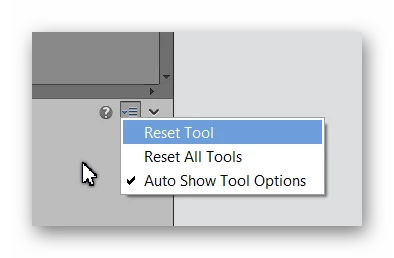
Without knowing more, all I can suggest is that you reset the tool.  At the far right of the Tool Options panel, there is a "hamburger" dropdown icon that allows you to reset the tool.


2 replies

Greg_S.
Community Expert
Greg_S.Community ExpertCorrect answer
Community Expert
December 28, 2019

Do you have more than one layer in the image?  (I assume that you are clicking when you are over the target area.)  Are you seeing the image overlay of the source area?

Without knowing more, all I can suggest is that you reset the tool.  At the far right of the Tool Options panel, there is a "hamburger" dropdown icon that allows you to reset the tool.


elbmekAuthor
Inspiring
December 28, 2019

This is quite strange. I reset as you suggested and it seemed to work. Now the image wont stay still??? It slides over itself?

elbmekAuthor
Inspiring
December 28, 2019

Forget my last. I unticked 'clone overlay' and it began working properly. Many thanks for your assistance.

Greg_S.
Community Expert
Community Expert
December 28, 2019

What tool options are selected? 

The tool still works with an Alt+Click of the source.  The only major change has been the Clone Overlay option which allows you to see exactly what the source will look like when placed over the target.  You can adjust the opacity and change how the tool behaves by clicking on the Clone Overlay button.

elbmekAuthor
Inspiring
December 28, 2019

I am in expert, and select clone stamp. place cursor on area to be copied, alt and left click on area then move to target and nothing!! I get a preview then nothing pastes into area.