


Inspiring
January 4, 2021
Question

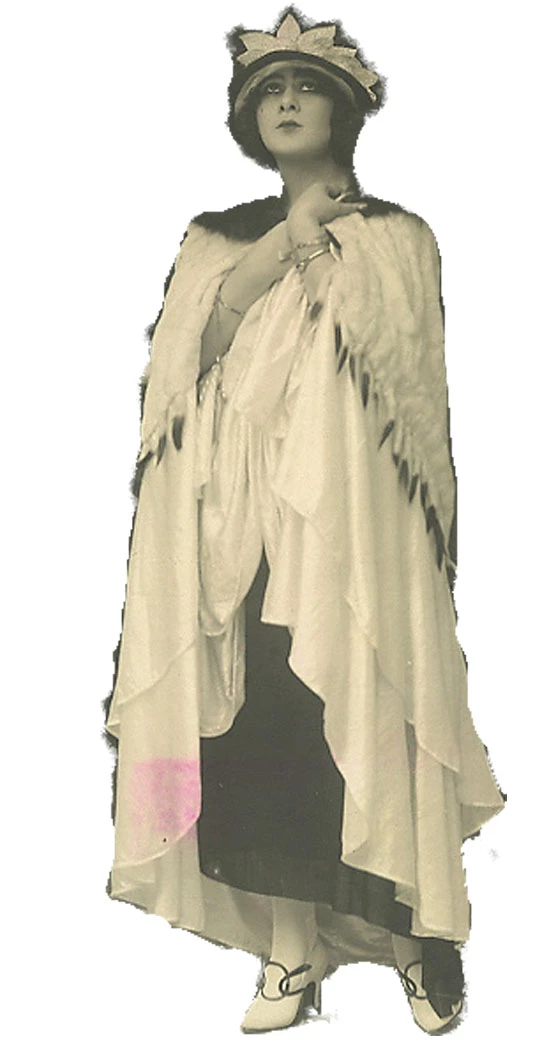
Cleaning up edges on this image

  • January 4, 2021
  • 1 reply
  • 501 views

I cleaned up this photo a few years ago as best I could. I'd like to use it in a collage. I just got the latest version of PSE. Is there a guided edit (or some other way) to clean up and smooth the edges of this lady so I don't have to cut them out by hand after printing? I sort of remember an easy way to extract someone from a background using the magic wand or an eraser tool. thanks!
This topic has been closed for replies.

1 reply

Greg_S.
Community Expert
Community Expert
January 5, 2021

With this particular photo, I don't think you can do better than use the regular eraser tool.  The photo is low resolution, so the black edges almost have to be removed on a pixel by pixel basis.  I have zoomed in quite a bit to see the individual pixels.  Then using the eraser with a small brush size, I can choose the black pixels, stop before I reach the cream colored area and choose whether or not to eliminate the pixels that are neither black nor cream. 


If you are starting out with a clean photo, then there are a number of other tools that can make a better selection to begin with.  Or you can use a Guided Edit.  But, in this particular case, it doesn't take very long to clean it up with the eraser.

Inspiring
January 5, 2021

Thank you very much. I do have a clean photo of this, actually. In it, however, the lady has a big dark collar, which I removed digitally when I did this years ago. I figure it would just be easier to use the eraser as you suggested.