Participant
Apr 8, 2025 10:49 PM UTC
Answered

Clearing out your Home page Recents

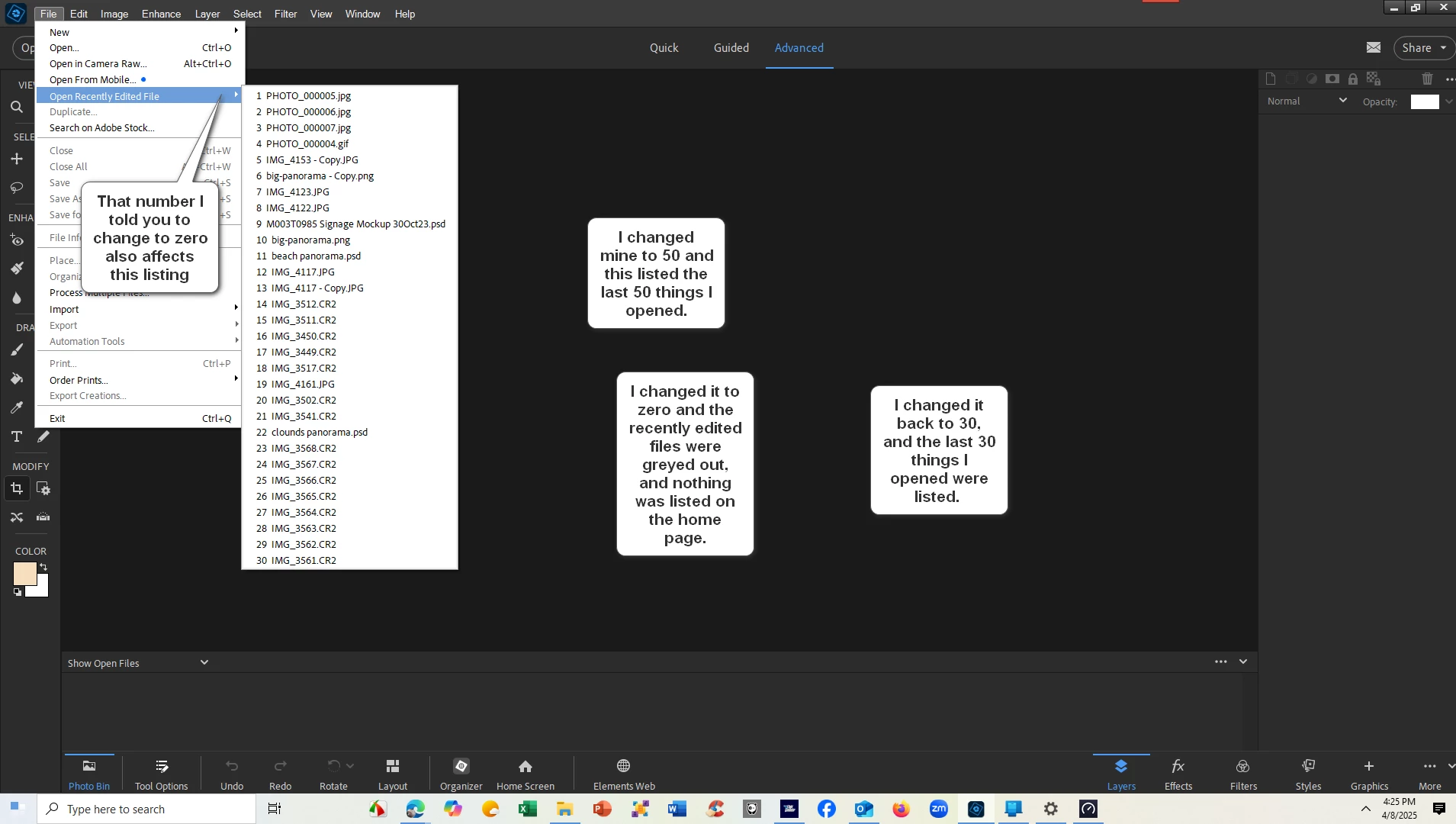
How do you clear your Recently used files from your home page?   Mine won't clear out.   Is there a way to turn this feature off?

Glenn 8675309
Glenn 8675309Correct answer
Legend
Apr 8, 2025 11:29 PM UTC

4 replies

Greg_S.
Community Expert
Community Expert
Apr 9, 2025 7:11 AM UTC

. . .  and the same is true for the Home Screen which is the question you asked.

Translate
Greg_S.
Community Expert
Community Expert
Apr 9, 2025 7:06 AM UTC

As Glenn has described, you can't clear the list and start with a new one.  I believe the information is taken from the Operating System, and if you reboot, the greyed out list shown in Glenn's screenshot will not appear.  (Not sure about that.)  But once you restore a number in Preferences, the last used files will reappear.

Translate
Glenn 8675309
Legend
Apr 8, 2025 11:16 PM UTC

EDIT>PREFERENCES

Translate
Glenn 8675309
Glenn 8675309Correct answer
Legend
Apr 8, 2025 11:29 PM UTC

Translate