Participant
Jun 21, 2024 1:26 PM UTC
Answered

cmd+z in PS Elements not working

Hi everyone:

I've just installed PS Elements and shortcut cmd+z has  two actions assigned: "Undo" and "haze removal".

So when using cmd+z , haze removal launches  and Undo is not working.

Some suggestions to fix that bug?

This topic is closed to new replies. Start a new post to keep the conversation going.
Jeff Arola
Jeff ArolaCorrect answer
Community Expert
Jun 23, 2024 6:02 PM UTC

Looks like that's a bug on the Mac side since Adobe added Haze Removal in PSE 14, which uses the same keyboard shortcut as Undo depending on the language version and/or what is set for undo shortcuts.


On the Windows side Haze Removal and Undo can have the same shortcut, but the undo shortcut takes precedence

where as on the Mac side the Haze Removal shortcut seems to take over.


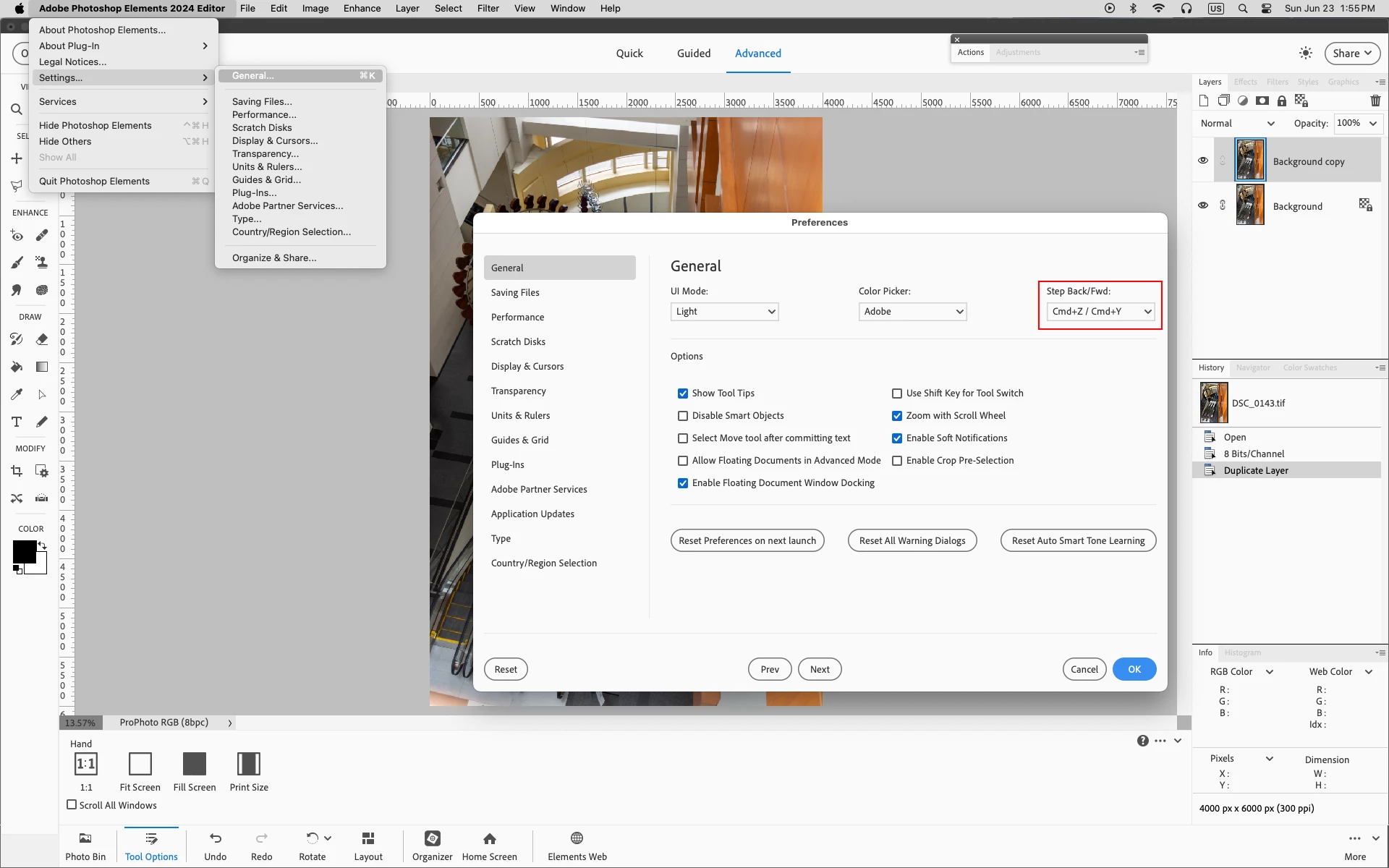
If you go to Adobe Photoshop Elements 2024 Editor>Settings>General>Step Back/Fwd:
you can set a different Undo shortcut.


9 replies

Jeff Arola
Community Expert
Community Expert
Jun 26, 2024 8:51 PM UTC

Changing to another set of Keyboard shortcuts for undo doesn't work?

Translate
Jeff Arola
Community Expert
Jeff ArolaCommunity ExpertCorrect answer
Community Expert
Jun 23, 2024 6:02 PM UTC

Looks like that's a bug on the Mac side since Adobe added Haze Removal in PSE 14, which uses the same keyboard shortcut as Undo depending on the language version and/or what is set for undo shortcuts.


On the Windows side Haze Removal and Undo can have the same shortcut, but the undo shortcut takes precedence

where as on the Mac side the Haze Removal shortcut seems to take over.


If you go to Adobe Photoshop Elements 2024 Editor>Settings>General>Step Back/Fwd:
you can set a different Undo shortcut.


Translate
Participant
Jun 23, 2024 11:16 PM UTC

Thank you for the idea Jeff. I'll change it.

I also will let Adobe now about the bug in order they take action on it.

Kind regards.

Miguel.

Translate
Jeff Arola
Community Expert
Community Expert
Jun 21, 2024 6:34 PM UTC

The keyboard shortcut for Enhance>Haze Removal is Option Cmd Z


Any chance your inadvertently pressing the Option key while using Cmd Z?


Translate
Participant
Jun 21, 2024 10:25 PM UTC

In my case, for some reason, Haze Removal ("Eliminación de neblina" in spanish) is asociated to cmd+z shortcut.


I don't understad what can be happening. ¿Perhaps a problem with spanish version?

Translate
Jeff Arola
Community Expert
Community Expert
Jun 21, 2024 2:21 PM UTC

What version of Photoshop Elements did you install?

The version of macOS your using?


Did you use Haze Removal before that happened?

Translate
Participant
Jun 21, 2024 3:49 PM UTC

Thanks for your answer

I'm using PSE 24

MacOS Monterrey  12.7.5

First time I was running PSE to open an image and trying some features , I simply pressed cmd+z as I used to do in PS to undo something, and haze removal launched automatically without undoing anything. Problem continues.


Translate
Glenn 8675309
Legend
Jun 21, 2024 5:57 PM UTC

These are two lists of keyboard shortcuts, let me know if they are of any help:

https://www.glenncuneo.com/


Translate