
CMYK sliders in PSE9
Hello,
I have been using PSE9 for years. It is installed on my Mac running OSX El Capitan.
There are some quirky things about it but it handles text and graphic images good enough for me as I save to PNG.
Recently I have been experimenting with POD T-shirt platforms and they are printing in CYMK. I purchased a black printed shirt that has CYMK swatches with percentage numbers. In PSE9 I found a little slider for CMYK. See enclosed image.
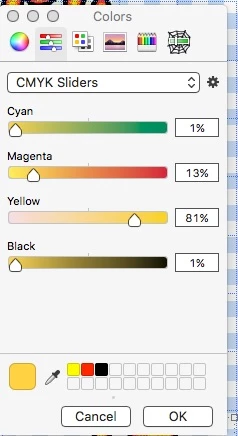
I can look at my sample shirt with swatches and then pop in the numbers for the colors I want.
Long story short, PSE9 froze up on me and I forced a quit. I thought maybe I'll upgrade. I have looked at the trial versions of PE 10, 12, 14 & 15 and this handy little CYMK slider function is gone.
So I reinstalled PSE9.
Would love to move up in the PSE world, but what to do about this missing CYMK slider function?
Anyone else doing this with PSE9?
Anyone have a work around for the upgrades taht will allow CYMK selections?
Thanks!
 AdChoices