
Color changes from ACR 9.5 to PSE 14
Hi -
When I open a RAW image in ACR 9.5 (through PSE 14) I can make all the changes I want in my color/exposure, etc. When I click "Open Image" so that it will open the image into PSE 14 directly, all of the colors are extremely muted and dulled. I have calibrated my monitor several times. I don't know how it could be the monitor though as I'm viewing the same image on the same monitor only seconds apart. I don't know what else I could change within ACR or PSE to make the colors appear the same. Below shows the color differences - the right image is the screenshot of the ACR version. The left is that same image opened directly to PSE 14.
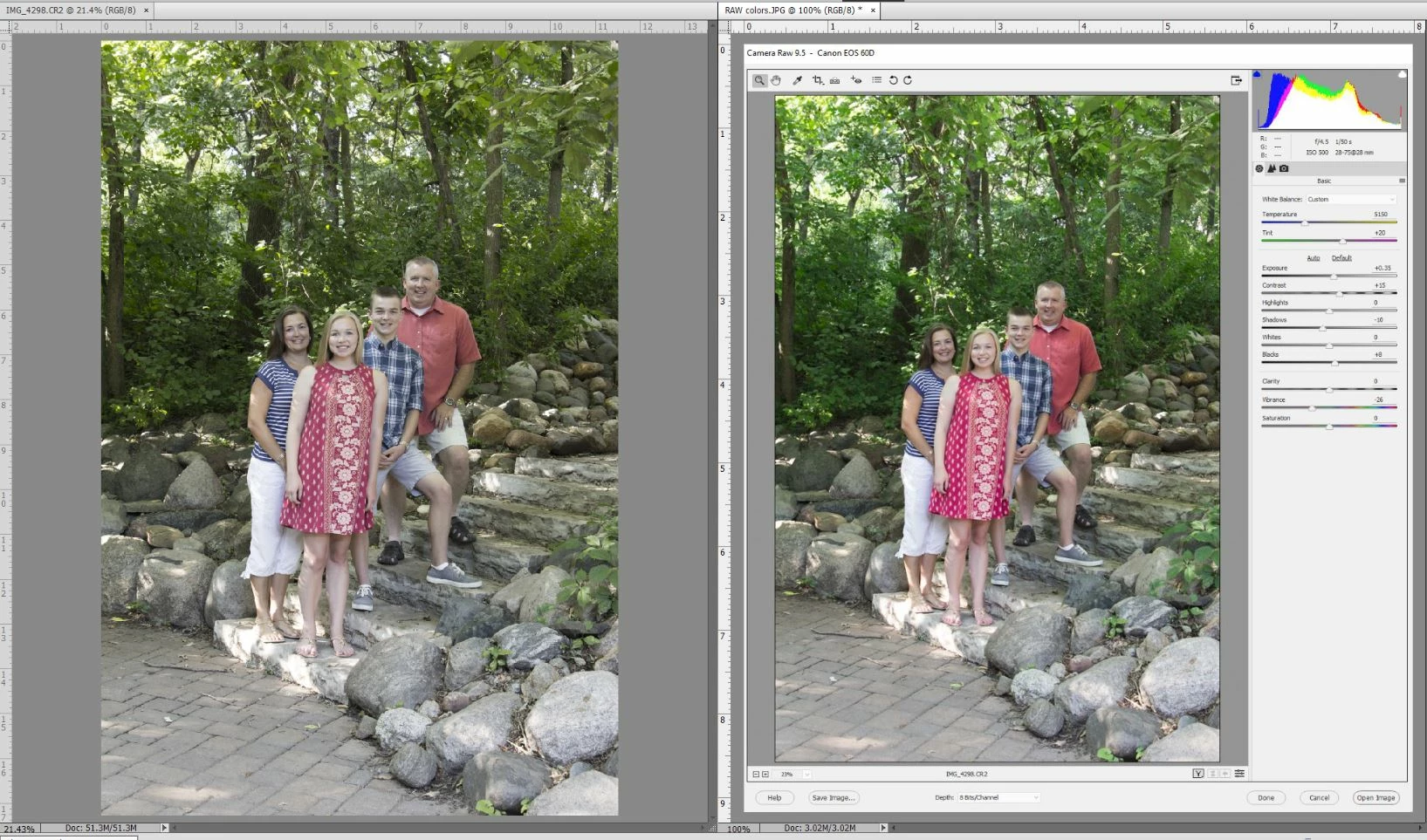
I hesitate to edit a bunch of photos and transfer to PSE for final adjustments not knowing which color option is the "correct" version. I would appreciate anyone's help in trying to figure this out.
Currently, I'm working on the ASUS ProArt monitor with the calibration set to Adobe RGB mode. (I have also calibrated it in "standard mode" and "sRGB mode" with both version producing the same effect of different colors represented in the ACR/PSE programs). Everything was calibrated with the Spyder5Pro. The image was shot with a Canon 60D, which is on the list of support through ACR. I'm not sure what other information would be useful.
Thanks in advance for any and all help!
Kerry


 AdChoices