Participant
November 27, 2022
Answered

Color photo problem

  • November 27, 2022
  • 3 replies
  • 617 views

I screwed up.  When I create a blank file and import a colored photo, it becomes black and white.  How do I fix this so it doesn't happen all the time????  

This topic has been closed for replies.
Correct answer Greg_S.

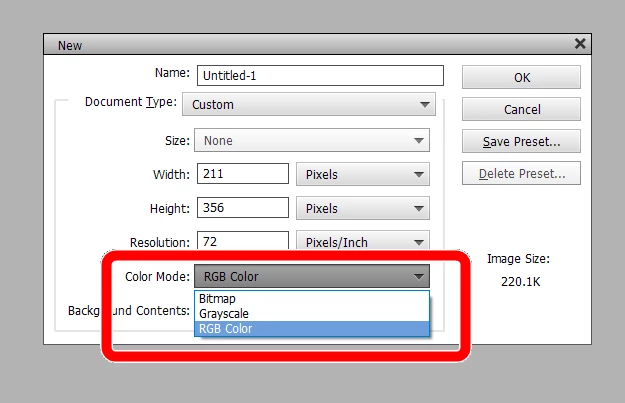
In the New File dialog, your Color Mode is probably set to Grayscale.  Change it to RGB Color and that setting should remain sticky and apply to future file creations until you change it again.


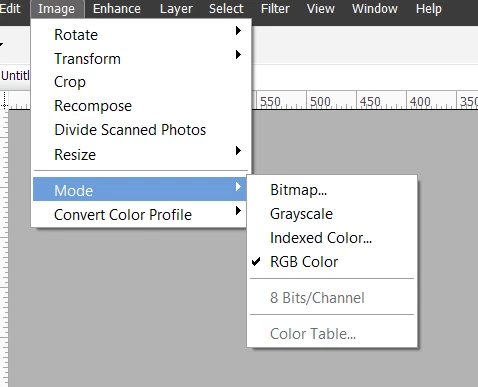
I assume you know that you can change the color photo that turns to black and white by going to the Image>Mode menu:

3 replies

Greg_S.
Community Expert
Community Expert
December 5, 2022

@Danny27322132498r, your latest post suggests that my mailbox is full. I don't have a mailbox on this forum other than a Private Message box which cannot possibly be full. I am, therefore, concerned that you have been contacted by a scammer (perhaps by Private Message) who either gave you a fake email or you replied via PM to an account that has been banned.  

If you were replying to my forum post via email (in response to a forum notification), and got a full mailbox message, please let us know what happened so that the Adobe forum admins. can investigate. 

Participant
December 6, 2022

Greg -  Well, I thought I was replying to you, since I hit the "reply" button.  You're dealing with a 75 year old fossil here, so it was probably my mistake.  Looking at this further, at the top of the email, it says "noreply".  Perhaps that's where my confiusion lies.  Anyway, you're advice fixed the problem and I'm totally satisfied.  Hopefully this is the place to reply.

Thanks again.

Participant
December 5, 2022

Yes.  The reply I got from Greg solved the problem.  I tried to reply back, but his mail box was full.  

Greg_S.
Community Expert
Greg_S.Community ExpertCorrect answer
Community Expert
November 27, 2022

In the New File dialog, your Color Mode is probably set to Grayscale.  Change it to RGB Color and that setting should remain sticky and apply to future file creations until you change it again.


I assume you know that you can change the color photo that turns to black and white by going to the Image>Mode menu: