
Participating Frequently
October 14, 2023
Question

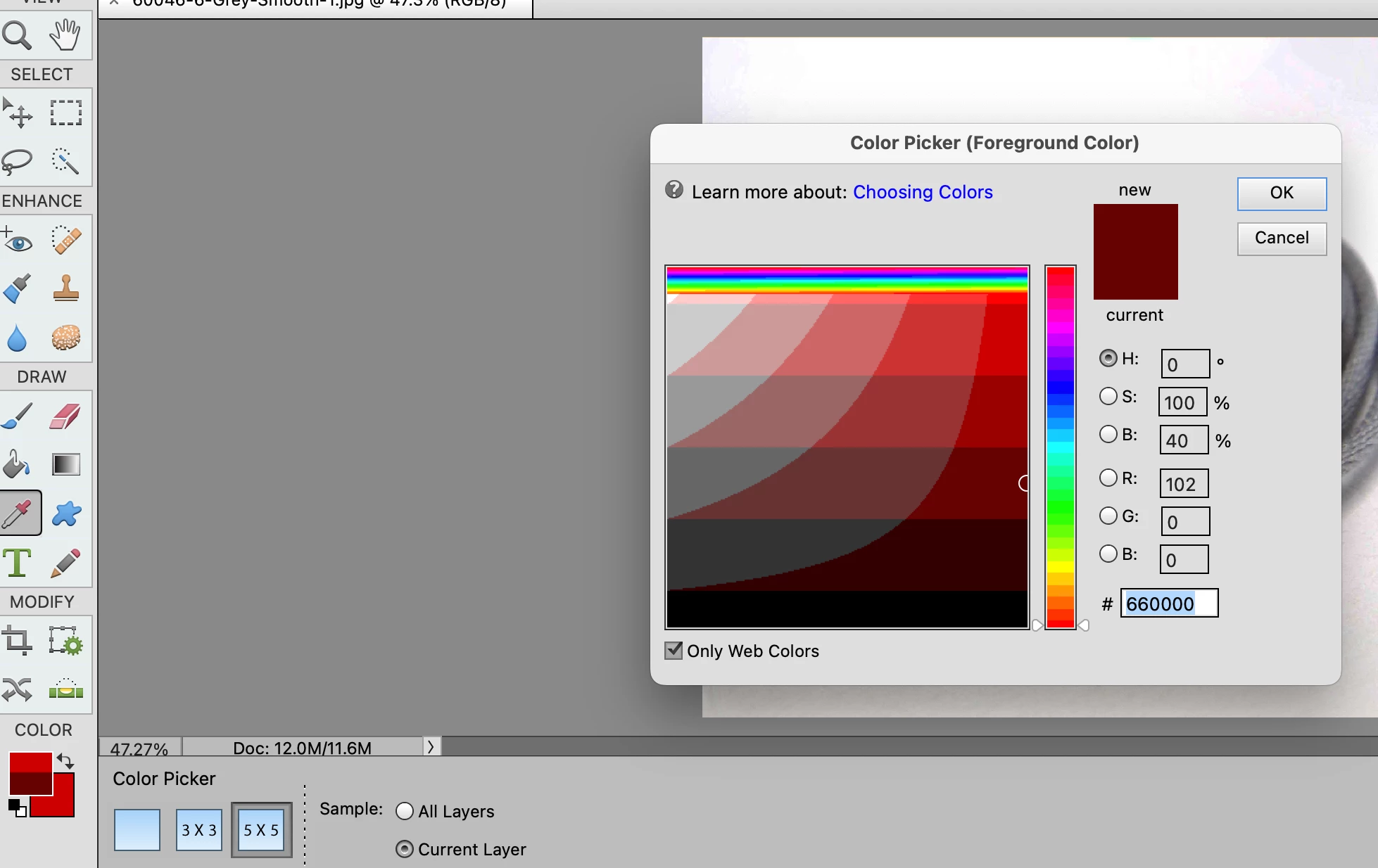
Color Picker not working correctly in PS Elements Editor

  • October 14, 2023
  • 8 replies
  • 676 views

There is distorted color at the top of the color picker square, and the foreground color square is split into two colors.  I have tried reseetting preferences and restarting Photoshop, and I have uninstalled Photoshop and reinstalled it. I am using Photoshop Elements 2021 Editor and the MacO|S is Sonoma 14.0.  Does anyone know how to fix this?


This topic has been closed for replies.

8 replies

Jeff Arola
Community Expert
Community Expert
December 21, 2023

Installing the macOS Sonoma 14.2.1 update seems to fix the interface graphical issues.

Participating Frequently
November 28, 2023

A distorted color is at the top of the color picker square in Adobe Photoshop Elements (2021 and previous versions), and the foreground color square is split into two colors.  Adobe HELP says that macOS Sonoma Version 14.1.1 DOES NOT support older versions of Adobe Photoshop Elements — I need to upgrade to Photoshop Elements 2024... The distorted and split color picker PROBLEM has nothing to do with my macOS graphics driver or monitor settings(.)

Participating Frequently
November 28, 2023


A distorted color is at the top of the color picker square in Adobe Photoshop Elements (2021 and previous versions), and the foreground color square is split into two colors.  Adobe HELP says that macOS Sonoma Version 14.1.1 DOES NOT support older versions of Adobe Photoshop Elements — I need to upgrade to Photoshop Elements 2024... The distorted and split color picker PROBLEM has nothing to do with my macOS graphics driver or monitor settings(.)

Participating Frequently
November 28, 2023

I have the same problem — there is a distorted color at the top of the color picker square, and the foreground color square is split into two colors. 

Participating Frequently
October 23, 2023

C'm here, c'm here, there's more.  When using the gradient tool, it used to affect the image as far as you stretched it, but now it seems to go the whole way across.

Participating Frequently
October 23, 2023

Further to this problem, you only see a quarter of the image when saving to web, also only since moving to sonoma 14.  Tries to chat to support, but they do not help people who only have a free creative cloud account.


Participant
October 22, 2023

Same problem with me.  


Jeff Arola
Community Expert
Community Expert
October 22, 2023

That occurs in macOS Sonoma 14.0 with photoshop elements versions 2022 and older.

Photoshop elements 2023 and 2024 don't seem to be affected by whatever is the cause.


Maybe the macOS Sonoma 14.1 update will fix it, but who really knows.

Participant
October 22, 2023

Thank you, Jeff--

It has been the source of much angst trying to figure out what the heck was wrong. Itsounds like nothing can be done at this point in time. Notwithstanding, it is really a nuissance and greatly inhibits being able to select lighter colors (near the top of affected color picker box) with any degree of accuracy. Kindly inform if there are any patches available in the future. Regards--- J

Participant
October 22, 2023

Steve,

Same exact deal here with me... I've tried a number of different things but nothing is working. Did you ever get it figured out?

Participating Frequently
October 22, 2023
No, not yet. Maybe a chat with Adobe support will help.

Sent from Outlook for Android<>