
Participant
November 27, 2024
Answered

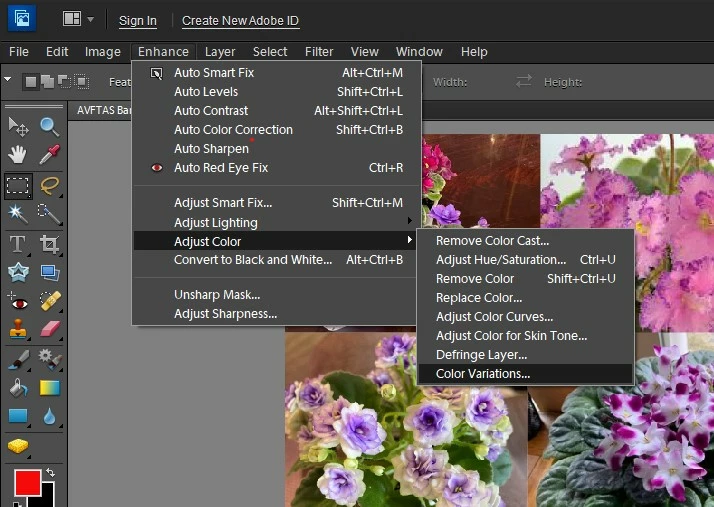
Color Variations under Enhance tab missing in 2025 version

  • November 27, 2024
  • 1 reply
  • 1086 views

I just upgraded from Photoshop Elements 10 to Photoshop Elements 2025 with the purchase of a new laptop.  The 2025 version does not have the "Color Variations" option under the Adjust Color functions under the Enhance tab.  I used the feature to color correct for lighting etc.  Is this no longer an option and what can I do to add/reduce reds, greens, blues etc. using the 2025 version?
This topic has been closed for replies.
Correct answer 99jon

It’s a very old tool withdrawn many versions ago.


I think its more powerful to us an adjustment layer:

Layer > New Adjustment Layer > Hue/Saturation > OK

You can use the RGB sliders (Master) or individual channels for red green and blue adjustments.


There is also a one-click color correction tool in the Quick mode under the quick actions panel.

1 reply

99jon
99jonCorrect answer
Genius
November 27, 2024

It’s a very old tool withdrawn many versions ago.


I think its more powerful to us an adjustment layer:

Layer > New Adjustment Layer > Hue/Saturation > OK

You can use the RGB sliders (Master) or individual channels for red green and blue adjustments.


There is also a one-click color correction tool in the Quick mode under the quick actions panel.

Participant
December 5, 2024

Thank you Jon!  This helps a lot!

-Andy

99jon
Genius
December 5, 2024

Glad to help Andy. I also have a few video tutorials covering the new features in Elements 2025  99jon Tech - YouTube