

mike23551318
Known Participant
August 4, 2018
Answered

COMMAND / KEYSTROKE FOR "MOTION BLUR" TOOL TO PROGRAM INTO RADIAL MENU

  • August 4, 2018
  • 1 reply
  • 728 views

Hello,

I am programming my WACOM Companion 2 tablet. Specifically the "RADIAL MENU".

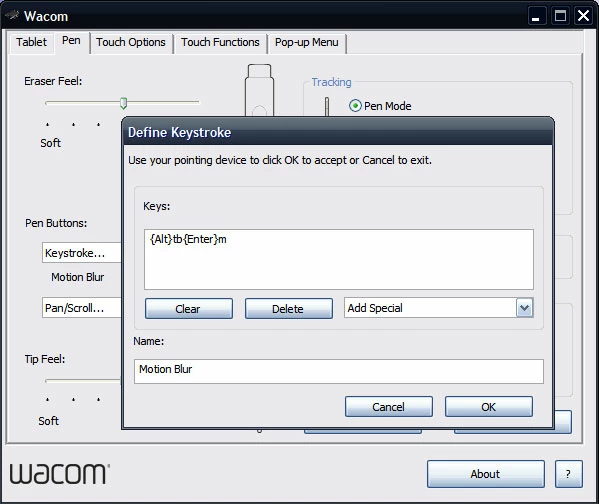
QUESTION: Can you tell me the command for programming the "Motion Blur" tool into one of the pie slices within the Companion 2 tablet's Radial Menu?  I need to define the Keystroke in the dialog box.

Thank you.

-Mark
    This topic has been closed for replies.
    Correct answer Jeff Arola

    Do you have the keystrokes for: Filter -- Blur -- and Motion Blur.


    Try entering this for a keyboard shortcut

    Press the Alt key then t then b then the Enter key then m

    Here's what it looks like in the Wacom Define Keystroke dialog

    1 reply

    Jeff Arola
    Community Expert
    Community Expert
    August 4, 2018

    What operating and adobe application are you using?

    mike23551318
    Known Participant
    August 4, 2018

    I have Photoshop Elements 15 on Windows 8.1. My device is a WACOM Companion 2 tablet. I'm trying to program the MOTION BLUR tool into the Radial Menu, which I activate with the pen.

    Jeff Arola
    Community Expert
    Community Expert
    August 4, 2018

    A shortcut for Filter>Blur>Motion Blur?