Known Participant
May 16, 2021
Answered

COPY A PARAGRAPH FROM WORD INTO PSE5

  • May 16, 2021
  • 2 replies
  • 539 views

how do i do this so i get a paragraph in pse5?

I use windows 7.

thanks all

This topic has been closed for replies.
Correct answer Greg_S.

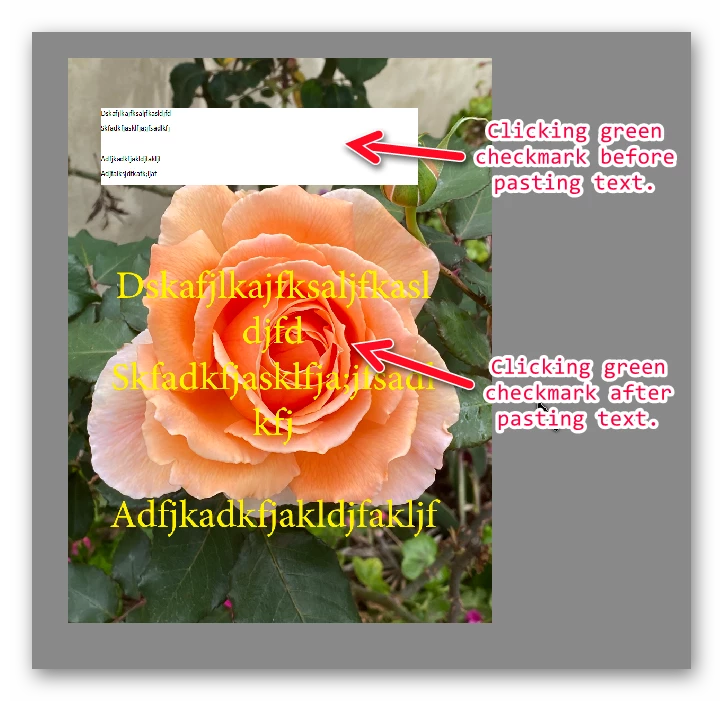
Using Glenn's method will only paste a new layer with the Word text into the image.  The text will not be editable and will have an opaque background. You will also create an empty text layer. 


You need to paste the text into the text box before clicking the green checkmark.  (I'm sure Glenn knows that and was just a little too quick with his instructions.)
 

2 replies

Greg_S.
Community Expert
Greg_S.Community ExpertCorrect answer
Community Expert
May 16, 2021

Using Glenn's method will only paste a new layer with the Word text into the image.  The text will not be editable and will have an opaque background. You will also create an empty text layer. 


You need to paste the text into the text box before clicking the green checkmark.  (I'm sure Glenn knows that and was just a little too quick with his instructions.)


Xx5FCDAuthor
Known Participant
May 16, 2021

Thanks guys, that worked fine.

PS no green mark in this ancient version!

Glenn 8675309
Legend
May 16, 2021
  • IN PSE 2021 (I'm assuming this will work in your version):
    COPY YOUR TEXT FIRST...


    click on the text tool> click on your canvas, HOLD the left mosue button down, and drag the text box however big you need it > click the green check mark> Paste your text. 

Participant
June 11, 2023

Can i ask if the same method will work with mac pages to PSE please

Jeff Arola
Community Expert
Community Expert
June 11, 2023

Yes it does here on macOS Ventura 13.4 and photoshop elements 2023.