
Participating Frequently
November 25, 2016
Answered

Creating folders

  • November 25, 2016
  • 1 reply
  • 1676 views

How do I create new folders in Photoshop Elements 15? I used to easily be able to create a new folder in Elements 14 by right clicking and "New Folder" would pop up and I would name it. I cannot do this with Elements 15. I need to put my photos in folders to organized them for windows.  There are numerous changes to 15 that serve no purpose other than to make it difficult to organize my photos as I have in the past. I don't even want to get started with the Instant Edit feature. That is now a nightmare!!
    This topic has been closed for replies.
    Correct answer mytaxsite

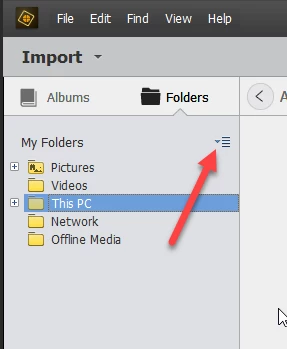
    OK open your Organizer and then on the left side look for something like this:

    That small drop-down list will have something called "View as Tree".  Click on it once so that the view is changed to look like mine in the picture.

    Now right-Click on "This PC" and then drill-down all the way until you reach a folder where you want to create a new folder.  I hope you get the idea from my brief explanation here but post back if you still need help.  You can right-Click on any folders to create a new folder.

    Good luck.

    1 reply

    mytaxsite
    Inspiring
    November 25, 2016

    Aren't you getting something like this?

    Participating Frequently
    November 25, 2016

    No, I am not. I am only getting Rename and Create Album. This is why I am so frustrated.

    Thank you,