
adamm25813575
Participant
May 28, 2018
Answered

Crop And Straighten not found under Automation Tools in PS Element 13.1

  • May 28, 2018
  • 1 reply
  • 745 views

Crop And Straighten option in Expert Mode is not showing up when selecting the File/ Automation Tool option. I have Photoshop Element 13.1 is running on Windows 10.

Where may I obtain the additional software/ code for this functionality and what steps are required to add it into my installed application?

Thanks in advance;

Freddie M.

[Here is the list of all Adobe forums... https://forums.adobe.com/welcome]

[Moved from generic Cloud/Setup forum to the specific Program forum... Mod]
    This topic has been closed for replies.
    Correct answer Jeff Arola

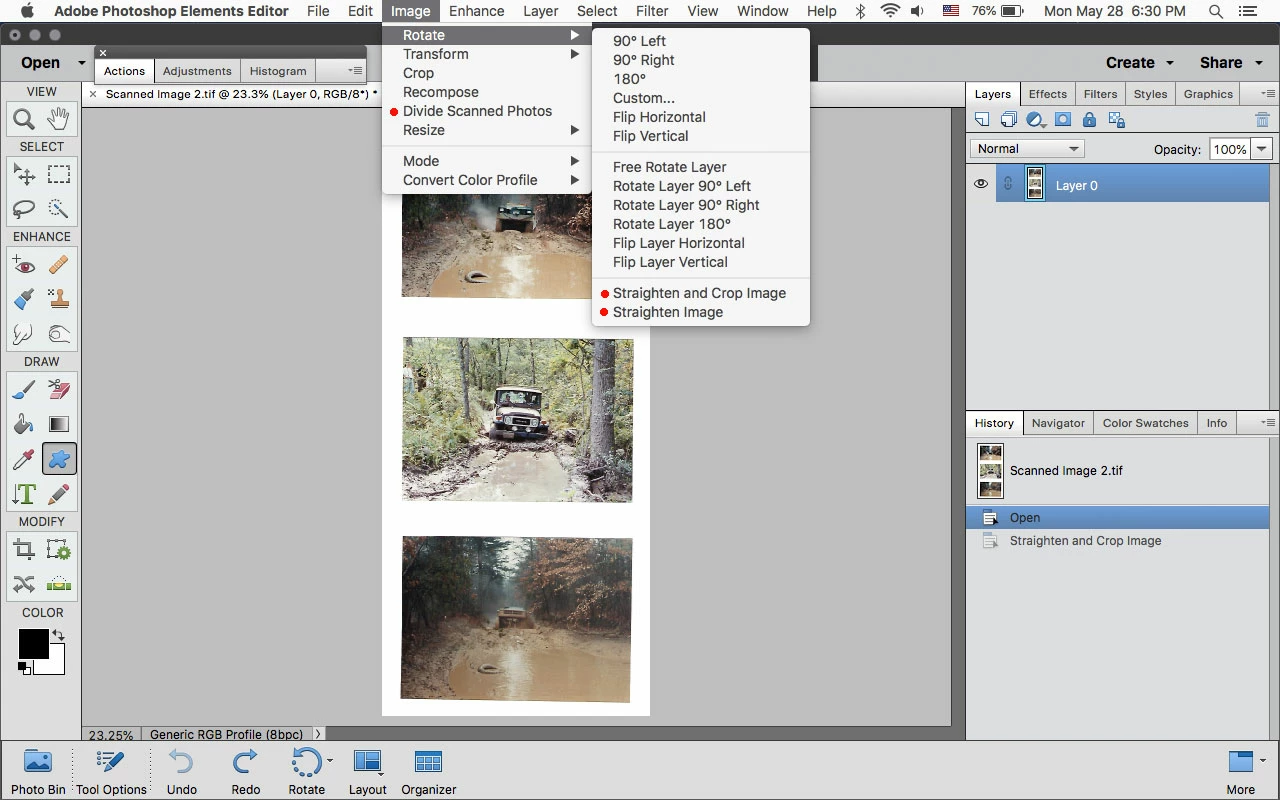
    In photoshop elements it's under Image.

    For scans with multiple images use Image>Divide Scanned Photos.

    For single images use Image>Rotate>Straighten Image or Straighten and Crop Image.

    1 reply

    Jeff Arola
    Community Expert
    Jeff ArolaCommunity ExpertCorrect answer
    Community Expert
    May 28, 2018

    In photoshop elements it's under Image.

    For scans with multiple images use Image>Divide Scanned Photos.

    For single images use Image>Rotate>Straighten Image or Straighten and Crop Image.

    adamm25813575
    Participant
    May 30, 2018

    Yes, Jeff, Right On!!! Many Thanks for saving me, finally, after I had already struggled for a few hours and still was unable to find a fix.

    All the Best;

    FM