Participant
April 28, 2019
Answered

Crop Suggestions

  • April 28, 2019
  • 4 replies
  • 1344 views

Can you turn off crop suggestions?

    This topic has been closed for replies.
    Correct answer Jeff Arola

    Are you using photoshop elements?

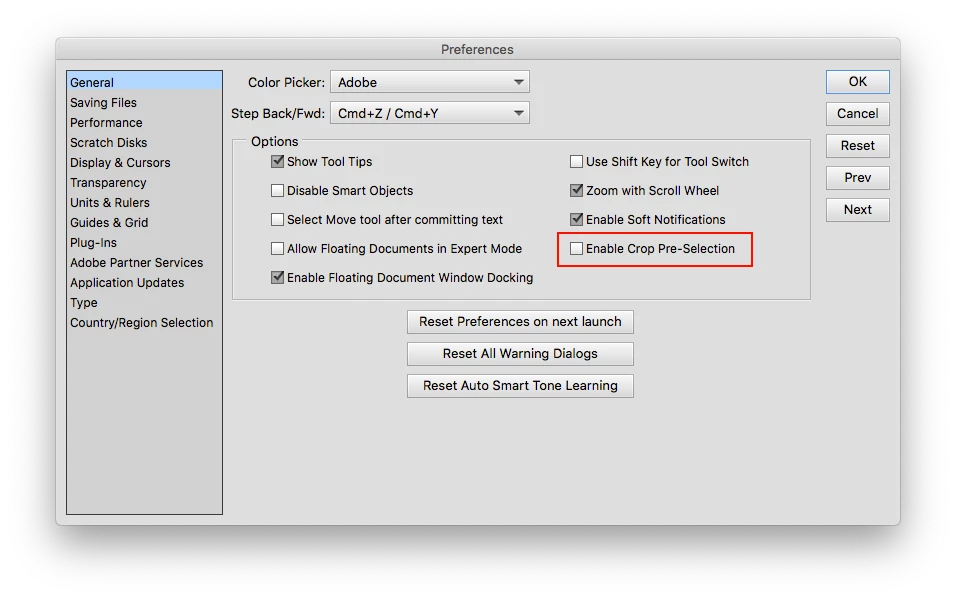
    About the best you can do is in Preferences>General, uncheck Enable Crop Pre-Selection.

    Edit>Preferences (windows) or Adobe Photoshop Elements Editor>Preferences>General (mac)

    Alas no you can't completely turn off crop suggestions, unfortunately.

    4 replies

    Participant
    February 21, 2022

    It seems that whoever came up with this idea was thinking about the most illerate computer person they could think about, someone who won't be using photoshop in the first place. It is one of the worse ideas I've come across because it slows down the cropping process. I'm an inspector and I have to do hundreds of photos a day, used photoshop for years, and it has slowed me down greatly. You would think that they would have allowed us to have the option to turn it on or not, but this is just another example of...Sorry, bottom-line, I wish that they would add a way to turn this off because now I have to learn a whole new photo editor.

    Does anyone have an idea of a program that is similar that I can get to replace photoshop?

    Jeff Arola
    Community Expert
    Community Expert
    April 2, 2020

    You could use the Rectangular Marquee Tool and then Image>Crop.


    The Prespective Crop Tool also works as long as you don't move the corners after drawing out the crop boundary.


    Participant
    April 29, 2019

    Thank you for your help. It was added with the last upgrade, I crop a lot of pictures each day, and for me, it sucks. It is useless (have not seen any suggestions that I would use), a distraction, and causes a slight delay. I've used the program for years and really like it.

    Participant
    April 2, 2020

    I agree 100% that the suggestions continuing to appear even when you have the Crop Pre-Selection disabled is an extreme pain. I also have not seen any suggestions that are the slightest bit useful for the kind of work I'm doing and the delay while the suggestions load and then re-load after doing a crop is annoying and costing significant time when doing a large number of crops.


    Greg_S.
    Community Expert
    Community Expert
    April 2, 2020

    If it bothers you so much, you can use the Rectangular Marquee tool and the Image>Crop command.

    Jeff Arola
    Community Expert
    Jeff ArolaCommunity ExpertCorrect answer
    Community Expert
    April 28, 2019

    Are you using photoshop elements?

    About the best you can do is in Preferences>General, uncheck Enable Crop Pre-Selection.

    Edit>Preferences (windows) or Adobe Photoshop Elements Editor>Preferences>General (mac)

    Alas no you can't completely turn off crop suggestions, unfortunately.