
Participant
April 17, 2018
Answered

Cropping in PSE 14 super shrinks my jpegs. Why?

  • April 17, 2018
  • 1 reply
  • 390 views

I've used PSE 14 successfully for the last couple of years.  Just recently, any time I crop an image at all, even the max jpeg is only a few hundred kb.  I shoot RAW on my D7200 and use ACR and then to photoshop.  An uncropped image on max jpeg is about 12MB.  If I crop even a little, the max jpeg is about 350kb.  I even took some old images from D90, and the same thing happens.  If I open my RAW D90 files in Capture NX2 and crop the same amount as in PSE I get a max jpeg of 3-4MB. I can't test my RAW D7200 images on Capture NX2 because it doesn't work with the D7200 since Nikon stopped supporting software.

This is a new problem, and I have no idea what I changed.

Any help would be appreciated.

Thanks.

Tom
This topic has been closed for replies.
Correct answer Jeff Arola

I would reset the pse 14 editor preferences and see that resolves the issue.

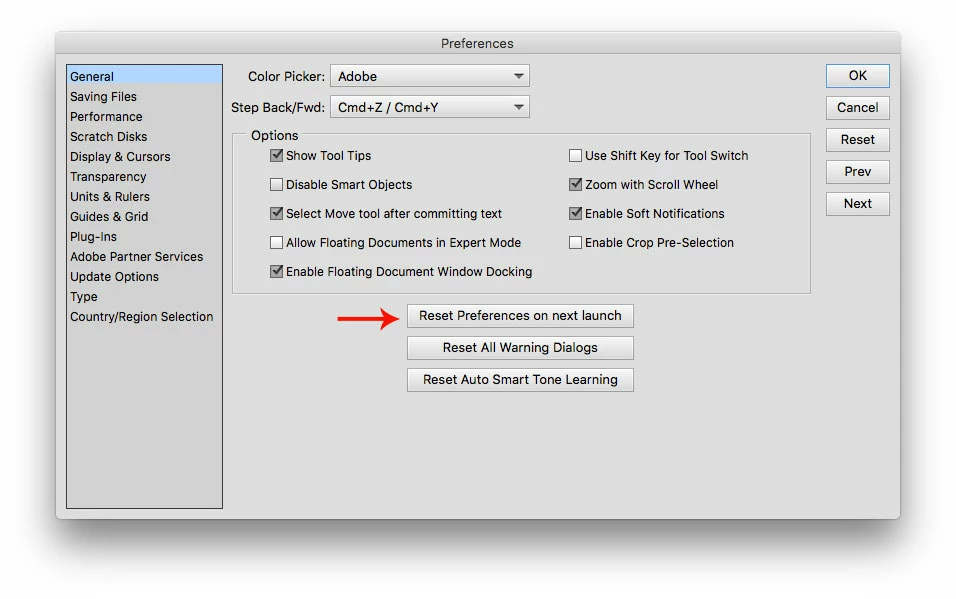
Go to Edit>Preferences>General (windows) or Adobe Photoshop Elements Editor>General (mac), click on Reset Preferences on next launch and restart the pse 14 editor.

1 reply

Jeff Arola
Community Expert
Jeff ArolaCommunity ExpertCorrect answer
Community Expert
April 17, 2018

I would reset the pse 14 editor preferences and see that resolves the issue.

Go to Edit>Preferences>General (windows) or Adobe Photoshop Elements Editor>General (mac), click on Reset Preferences on next launch and restart the pse 14 editor.

zzziiijjjAuthor
Participant
April 17, 2018

Thank you. Thank you.  I actually have keyboard marks on my brow from banging my forehead keys these last few days.  Thanks for your help!

Tom