Answered
Deleting photo from the catalogue in Elements 2023
When I delete photos from the catalouge in Elements they show up in the wastebin in Windows 11 if I then clear the wastebin do I remove the photos from the files on the computer?

When I delete photos from the catalouge in Elements they show up in the wastebin in Windows 11 if I then clear the wastebin do I remove the photos from the files on the computer?
Hi @gjmw . When you delete files from the catalogue, a confirmation box pops up and you are given the option to also delete the files from your hard drive. If you chose that option, then yes the files will be totally removed from your computer when you clear the wastebin.
The Organizer only catalogues the files on your hard drive; it does not make copies of them. So, if for some reason you want to remove files from the catalogue but not from the hard drive, do not check the box to delete from the hard drive:
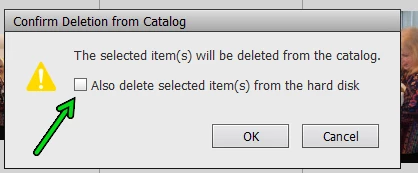
If you kept the box unchecked, and were deleting a lot of files at one time, it is possible that some temorary copies of the files were sent to the wastebin. If that is the case, there will be no harm in emptying the wastebin.
Already have an account? Login
Enter your E-mail address. We'll send you an e-mail with instructions to reset your password.


 AdChoices