
Participant
December 27, 2017
Answered

Dialog box background color

  • December 27, 2017
  • 1 reply
  • 682 views

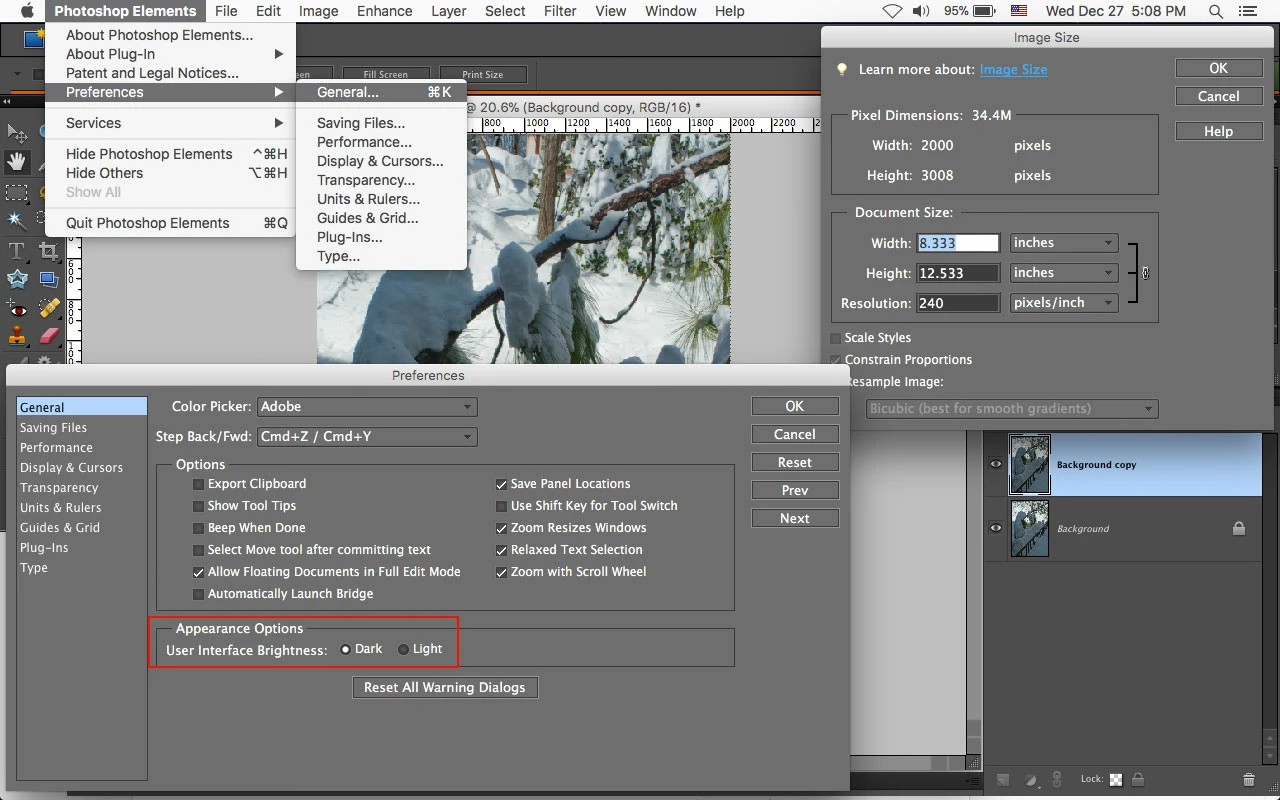
Photoshop Elements 8  . . . The background color in all my dialogue boxes has gone dark, so now I can't see the text unless I drag the mouse cursor over the box.  Tried looking in "preferences," but couldn't find anything.  Can anyone help?
This topic has been closed for replies.
Correct answer Jeff Arola

With pse 8 i always have the Interface Appearance set to Dark, which makes everything much easier to see.

Photoshop Elements>Preferences>General>Appearance Options>Dark

1 reply

Jeff Arola
Community Expert
Community Expert
December 27, 2017

What operating system are you using?

Could you post a screenshot of what your seeing?

BuynomoreAuthor
Participant
December 27, 2017

>  What operating system are you using?

MAC 10.9.5

Could you post a screenshot of what your seeing?

You bet.  Several screenshots on one jpeg:

Jeff Arola
Community Expert
Jeff ArolaCommunity ExpertCorrect answer
Community Expert
December 27, 2017

With pse 8 i always have the Interface Appearance set to Dark, which makes everything much easier to see.

Photoshop Elements>Preferences>General>Appearance Options>Dark