Participant
June 13, 2020
Answered

Drawing Lines

  • June 13, 2020
  • 3 replies
  • 4681 views

How do I draw a line with and arrow head on each end in Photoshop Elements 14?

This topic has been closed for replies.
Correct answer Greg_S.

@kathleenr16571499, what OS and version of Elements are you using?

Please describe the problem you are having in more detail.  And here is another way to create a double-headed arrow:
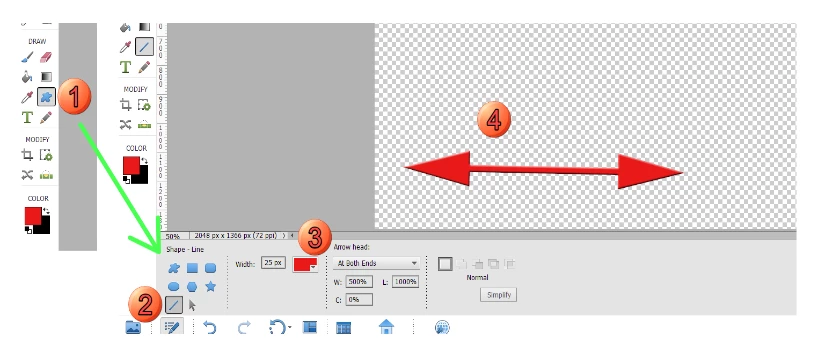
 

  1. Select the Shape tool.
  2. In the tool options panel, select the line shape.
  3. Select the size, color and type of arrow you want to draw (in this case I have chosen At Both Ends from the dropdown menu).
  4. Draw the line.


3 replies

Greg_S.
Community Expert
Greg_S.Community ExpertCorrect answer
Community Expert
September 22, 2023

@kathleenr16571499, what OS and version of Elements are you using?

Please describe the problem you are having in more detail.  And here is another way to create a double-headed arrow:


  1. Select the Shape tool.
  2. In the tool options panel, select the line shape.
  3. Select the size, color and type of arrow you want to draw (in this case I have chosen At Both Ends from the dropdown menu).
  4. Draw the line.


Participating Frequently
September 22, 2023
thank you for quick reply. I nee to find an arrow shape for a logo i am
making but when i go to custom shape and up to properties bar. I click on
the gear to open all graphics like they do on the tutorial and only 4
appear. I will give your method a try gotta put it down for now
Kathleen
Skeezix27Author
Participant
June 14, 2020

<meta http-equiv="Content-Type" content="text/html; charset=UTF-8" />


Thank you very much for this. I did get a line with an arrowhead on each end so I didn’t have to do the extra steps.


This was very helpful and time saving for me.


hatstead
Inspiring
June 14, 2020

You're welcome. Glad to help.

hatstead
Inspiring
June 13, 2020

Activate the custom shape tool.

The default shapes "library" has an arrowhead. Drag it out to suit; it will come in as a separate layer called Shape 1

To get the arrow head in the other direction as well, right click on Shape 1 layer in the layers palette, and duplicate the layer,  yielding Shape 1 copy layer.

Activate the transform tool (CTRL+T) and flip the layer 180 degrees, and position appropriately.


Participating Frequently
September 22, 2023

i CANT OPEN DEFAULT SHAPES. UGH.  I WILL TRY YOUR SUGGESTION BUT GETTING FRUSTRATED