Participant
February 2, 2021
Answered

duplicating a photo in Organizer

  • February 2, 2021
  • 1 reply
  • 323 views

This should be easy but I need help.

How does one duplicate a photo file from within the Organizer?

I would like to edit the copy  and leave the original untouched


Thanks. Jeff

This topic has been closed for replies.
Correct answer Greg_S.

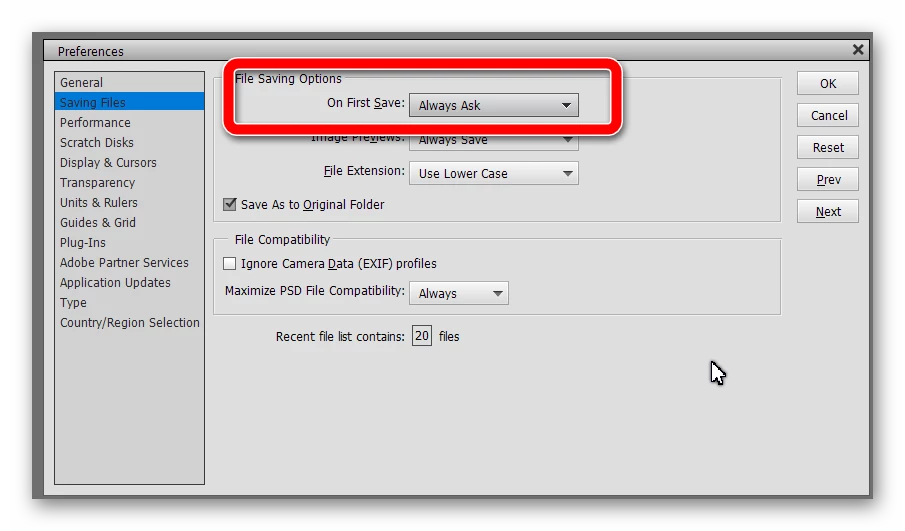
There are several different workflows that allow you to save a copy of a file for editing.  But first, go to Edit>Preferences>Saving Files and in the box for On First Save, choose Always Ask.  I believe you will then always be asked to confirm whether you want to save a copy of the (edited) file whether you click the Save or Save As options under the File menu.
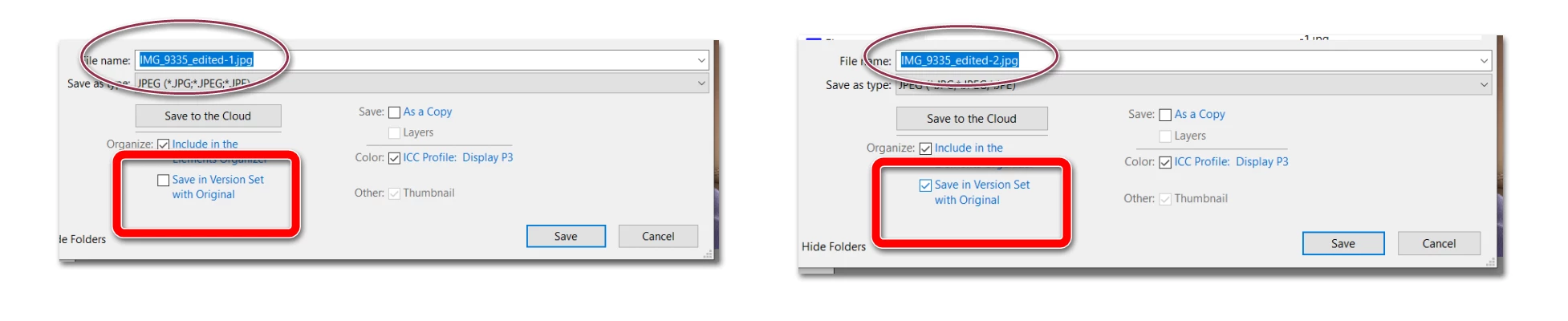
  • Once you open a file in the Editor, select File>Save As and in the dialog that opens, check the boxes for Include in the Elements Organizer and Save in Version Set.  In the following screenshots, you will see that the existing name of the file (automatically) changes to a new numerical suffix when the Save in version set option is checked.  These checkbox options should be sticky - that is the boxes should remain checked until you change the options.
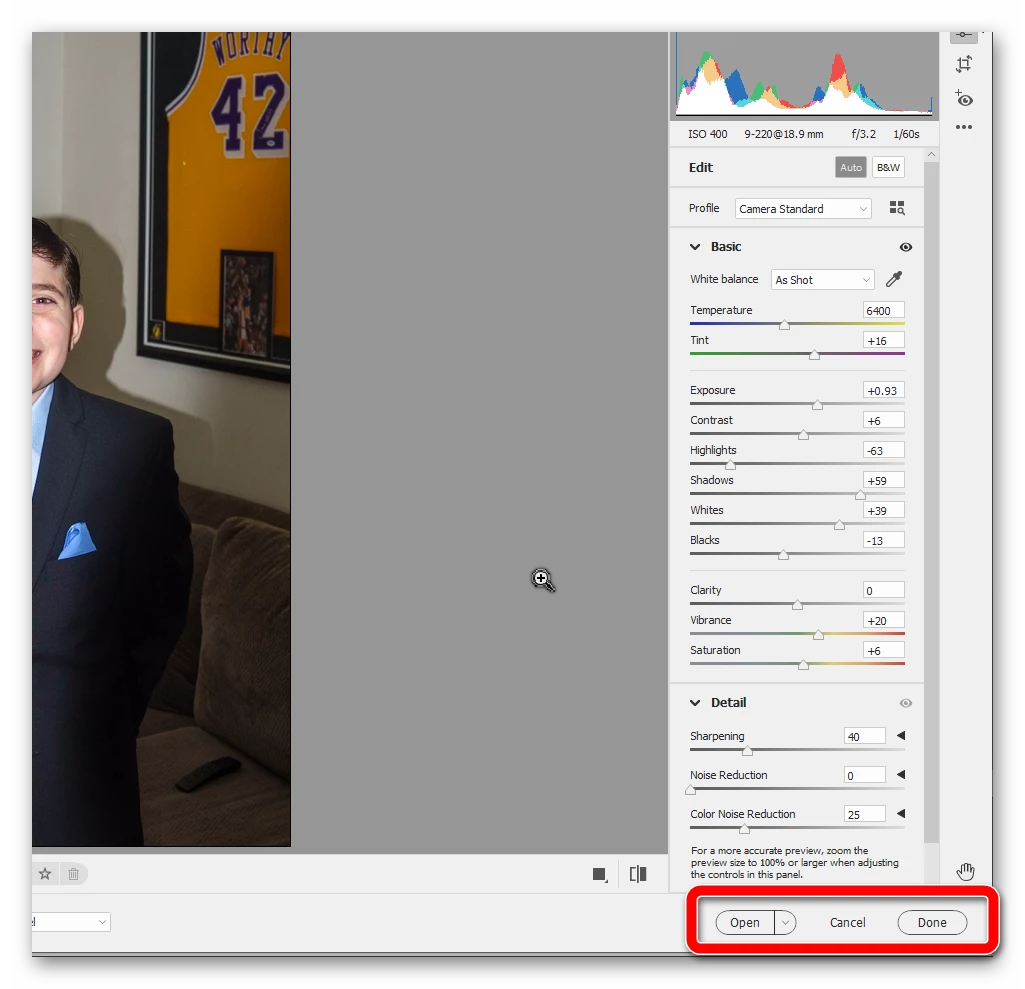
  • The type of file you open in the Editor also affects the workflow for saving it.  If you open a raw file and make changes to it in Adobe Camera Raw (ACR), you can either save the changes by clicking the Done button or you can click the Open button and save the file via the Editor's Save or Save As commands. 
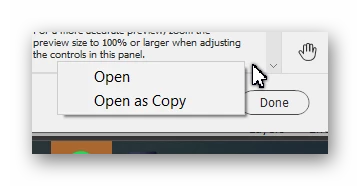
The Open button also has an option to save as a copy.  If you choose this option, when you close the file, it will default to save as a jpeg copy of the raw file.
 

  • If you choose the Done button in ACR, the changes are made to the raw file BUT those changes are made via a text sidecar file.  The raw file itself will never be changed.  And you can always revert the file to the way it looks in the original.
  • In the Organizer's File menu, you can also Export a file as a copy.  Once the file is saved, you can open the copy.  But to me, this would be an unnecessary step to take.


The bottom line is that it is extremely difficult to work on an original file and then overwrite it with the edits that have been made.


 

1 reply

Greg_S.
Community Expert
Greg_S.Community ExpertCorrect answer
Community Expert
February 2, 2021

There are several different workflows that allow you to save a copy of a file for editing.  But first, go to Edit>Preferences>Saving Files and in the box for On First Save, choose Always Ask.  I believe you will then always be asked to confirm whether you want to save a copy of the (edited) file whether you click the Save or Save As options under the File menu.

  • Once you open a file in the Editor, select File>Save As and in the dialog that opens, check the boxes for Include in the Elements Organizer and Save in Version Set.  In the following screenshots, you will see that the existing name of the file (automatically) changes to a new numerical suffix when the Save in version set option is checked.  These checkbox options should be sticky - that is the boxes should remain checked until you change the options.

  • The type of file you open in the Editor also affects the workflow for saving it.  If you open a raw file and make changes to it in Adobe Camera Raw (ACR), you can either save the changes by clicking the Done button or you can click the Open button and save the file via the Editor's Save or Save As commands. 

The Open button also has an option to save as a copy.  If you choose this option, when you close the file, it will default to save as a jpeg copy of the raw file.


  • If you choose the Done button in ACR, the changes are made to the raw file BUT those changes are made via a text sidecar file.  The raw file itself will never be changed.  And you can always revert the file to the way it looks in the original.
  • In the Organizer's File menu, you can also Export a file as a copy.  Once the file is saved, you can open the copy.  But to me, this would be an unnecessary step to take.


The bottom line is that it is extremely difficult to work on an original file and then overwrite it with the edits that have been made.

 

jsalba48Author
Participant
February 2, 2021

Thanks so much for the prompt detailed explanation
