
Participant
March 24, 2017
Answered

Edit>Full>Content>Effects will not launch in Photoshop [was:Premier] Elements 9

  • March 24, 2017
  • 1 reply
  • 409 views

Doesn't matter which layer I choose, locked or not, and when my cursor travels over the display window below the options a circle with a diagonal line appears.

[Post moved to the Premiere Elements forum]
    This topic has been closed for replies.
    Correct answer Jeff Arola

    The Content and all that stuff is in

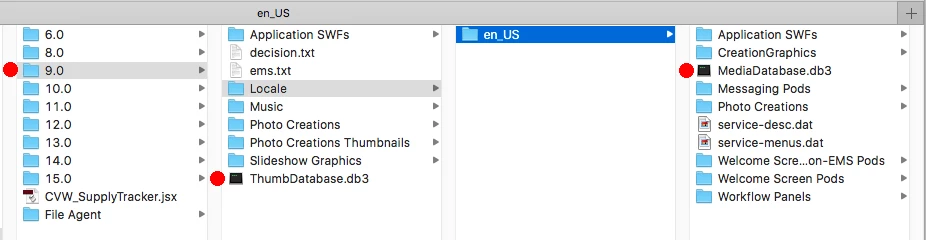
    /Library/Application Support/Adobe/Photoshop Elements/9.0

    (the hard drive library not the user library)

    If all that stuff is there on your mac, i would delete the following two files to rebuild the content effects database.

    delete

    (Move to Trash)

    ThumbDatabase.db3

    (/Library/Application Support/Adobe/Photoshop Elements/9.0)

    and

    MediaDatabase.db3

    (/Library/Application Support/Adobe/Photoshop Elements/9.0/Locale/en_US)

    Then start the pse 9 editor and wait for the content effects database to rebuild, which could take 10 mins or so.

    1 reply

    Legend
    March 24, 2017

    It's not clear what you're asking.

    There are no layers in Premiere Elements. There are video tracks. Is that what you're talking about?

    Can you post a screen capture of your timeline with this circle and diagonal line on it?

    Participant
    March 24, 2017

    sorry, photoshop elements 9

    Peru Bob
    Community Expert
    Community Expert
    March 24, 2017

    jb94282713  wrote

    sorry, photoshop elements 9

    Moved to Photoshop Elements Forum.