
Editor does not launch from PSE 14 Organizer
After more than a year of use, the Editor suddenly does not launch anymore when I try to activate it from the Organizer. The usual message "Launching the Editor workspace" appears, but then disappears after half a minute. The Windows 10 system log shows the following error (I am using a Dutch language version, which I hope is self-evident in this case):
Naam van toepassing met fout: PhotoshopElementsOrganizer.exe, versie: 14.0.0.0, tijdstempel: 0x566554ab
Naam van module met fout: KERNELBASE.dll, versie: 10.0.15063.296, tijdstempel: 0xa0527b0c
Uitzonderingscode: 0xc06d007e
Foutmarge: 0x0000000000069e08
Id van proces met fout: 0x16b4
Starttijd van toepassing met fout: 0x01d2cdb783d9dee1
Pad naar toepassing met fout: C:\Program Files\Adobe\Elements 14 Organizer\PhotoshopElementsOrganizer.exe
Pad naar module met fout: C:\WINDOWS\System32\KERNELBASE.dll
Rapport-id: 43e46023-2c98-4e94-900b-c8cebf9620f9
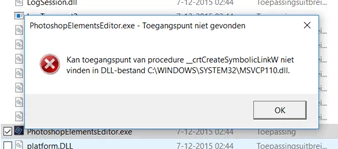
When I try to start the Editor by activating the exe-file, it reports it cannot find an access point in MSVCP110.dll
Any suggestions please? (I have tried to remove the preference file, as suggested elsewhere in this forum)
 AdChoices