Answered
Effects Panel Help
When I go to the effects panel it doesn't show the filters or styles tab. How do I find these?

When I go to the effects panel it doesn't show the filters or styles tab. How do I find these?
What OS and version of Elements are you using?
There are seveal ways to access these tabs from more recent versions. The following is Elements 2020:
The tabs are available in the Basic Workspace at the lower right.
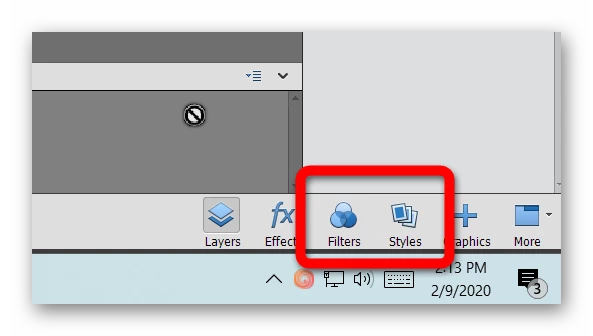
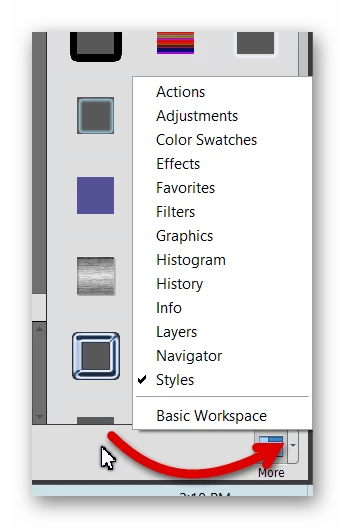
If you can't see these buttons, then you may be in the Custom Workspace, in which case you can click on the tiny arrow next to the More button and select a tab from the menu that opens. (You can also choose the Basic Workspace from there.)
Other options include opening the tabs from the Window menu:
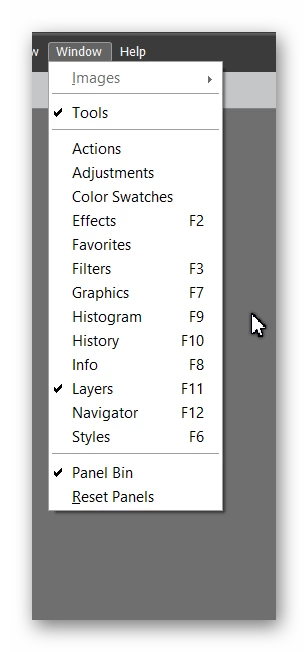
Or you can use the keyboard shortcuts set out in the Window menu - F3 (filters) and F6 (styles)
If your problem is that the tabs aren't opening or are blank, try resetting the preferences file. Immediately after launching the program, press Alt+Shift+Ctrl (for Windows). A message should pop up asking if you want to delete the Settings file. Answer OK.
If I haven't answered your question, please give us a screenshot of what you are seeing.
Already have an account? Login
No account yet? Create an account
Enter your E-mail address. We'll send you an e-mail with instructions to reset your password.


 AdChoices