

roschi8
Participant
April 17, 2026
Question

Einzelne Fotos werden im Organizer nur grau dargestellt

  • April 17, 2026
  • 1 reply
  • 28 views

Hallo, ich benutze Adobe Photoshop Elements 2026. Dabei tritt folgendes Problem auf: ich kopiere Bilder vom Handy in meine Ordner „Eigene Bilder“ auf mein Surface mit Windows 11. Soweit alles gut. Öffne ich dann den Organizer werden die Bilder auch importiert, allerdings werden einige Bilder nur als grauer Hintergrund dargestellt, andere vollständig. Öffne ich dann den Editor werden die grauen Bilder richtig dargestellt.  Was ist die Ursache?
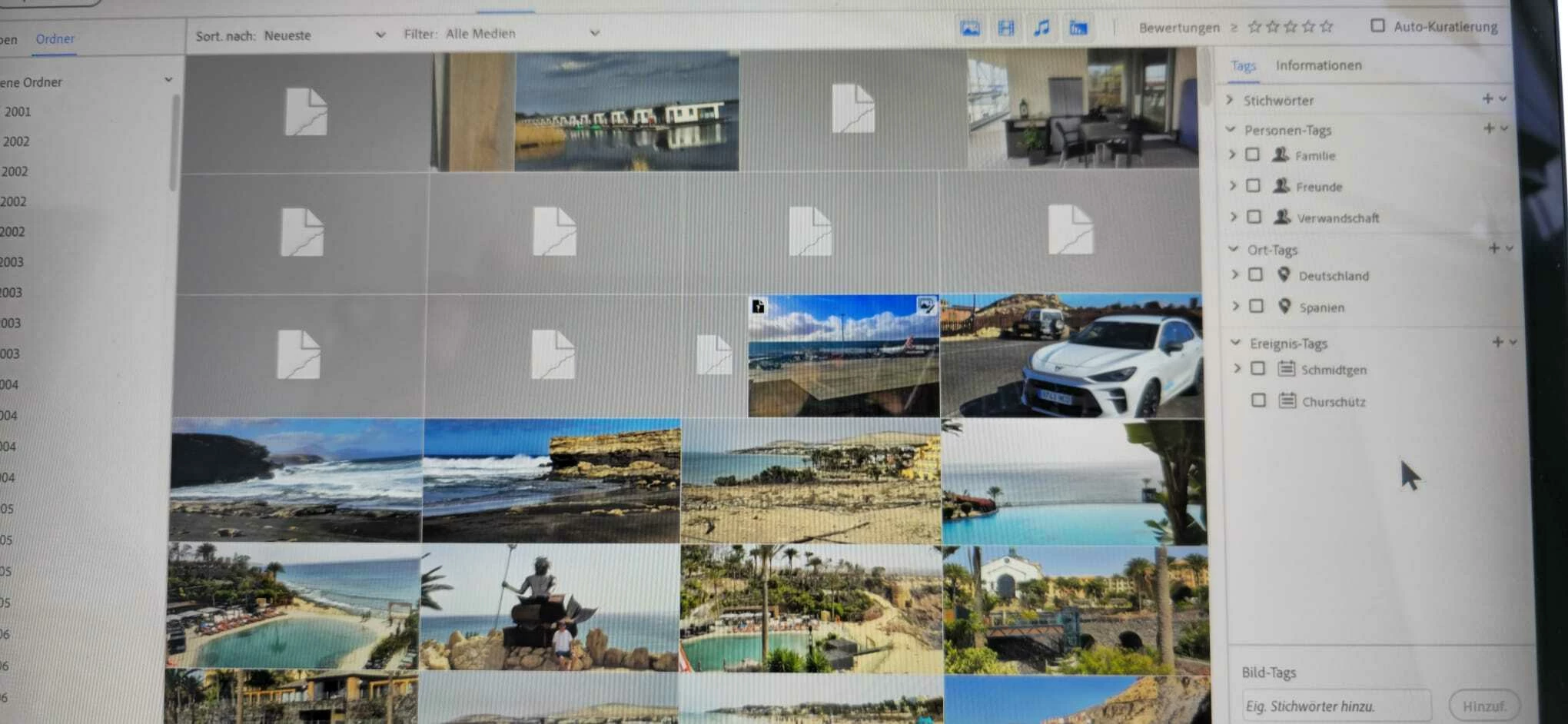
 

1 reply

99jon
Legend
April 17, 2026

This often happens with images that have very large pixel dimensions and can be affected by the amount of your system memory (RAM)


You could try batch processing to smaller dimensions and then importing the copies. From the Editor menu go to:


File > Process Multiple Files

Choose a separate source and destination folder and import the copies from the destination folder.


Alternatively, after opening individual images in the Editor re-size before saving.

https://helpx.adobe.com/photoshop-elements/kb/maximum-image-size-limits-photoshop.html