The reason this folder is grayed out is that it probably doesn't exist on your hard disk, which is why its context menu is also disabled. To use folders, you don't necessarily need to have it's media present in EO.
You are right now in list view of folders. change to View as Tree by clicking on the small triangular widget in folders panel:
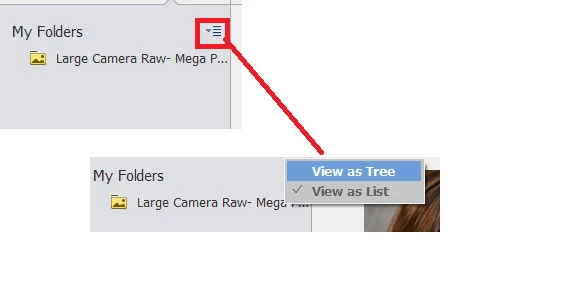
This would show the folders in hierarchical form as present on your hard disk. Right click on the parent folder and select Show All subfolders. This would reveal all the subfolders under this folder irrespective of the fact if the media from them is present or not.
And if the folder is not present on your hard disk but still it shows up then this is a refresh lag. Click on Albums in left panel and then back to Folders . This should remove the deleted folders if any.
Please try this and tell if I was able to resolve your query. Any more queries are most welcome.
Thanks,
Arshla



 AdChoices