paulg70204950
Participant
November 23, 2017
Answered

Elements 13 catalog file folders in wrong place when converted to Elements 2018

  • November 23, 2017
  • 2 replies
  • 518 views

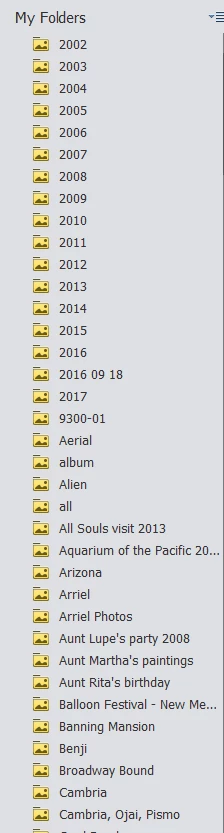
Elements 2018 found my Elements 13 catalog and converted it.  I had all of my files and subfolders filed by year.   Now the year folders still have the picture files inside but all the subfolders that were also there are now sitting outside at the root of the catalog.  Need some suggestion please.

    This topic has been closed for replies.
    Correct answer MichelBParis

    paulg70204950  wrote

    My Elements 13 organizer won't open anymore so I can't show a direct compare.  Basically I only had 'year' folders at the root along with a small handful of misc folders.  All the folders shown below 2017 should be inside the year folders.
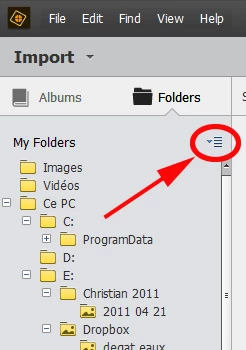
    Set your left folders panel to 'tree view', not the flat list view.

    Use the menu just right of the 'My folders' title.
    You are showing the 'list' view which shows only the subfolders in the lowest tree hierarchy, omitting their parent folders. The files are sorted in alphanumeric order. That may be helpful for some types of searches, but the tree view is more usual. It works about the same as in the Explorer or Finder but it does not show empty folders by default. If you want to see all subfolders including those without images, right click on the parent subfolder and choose to show all files.

    2 replies

    fotografffic
    Known Participant
    November 24, 2017

    My apologies. Based on MichelBParis's reply, seems I misunderstood the original poster's question, so I've removed my response.

    MichelBParis
    Legend
    November 23, 2017

    paulg70204950  wrote

    Elements 2018 found my Elements 13 catalog and converted it.  I had all of my files and subfolders filed by year.   Now the year folders still have the picture files inside but all the subfolders that were also there are now sitting outside at the root of the catalog.  Need some suggestion please.

    Maybe a screenshot of your folders panel in 'tree' mode in both versions would help?

    (use the 7th icon on the top tool bar of your message) to include the screenshot in your answer. That does not work by mail, you have to be logged in the forum with your browser.

    paulg70204950
    Participant
    November 23, 2017

    My Elements 13 organizer won't open anymore so I can't show a direct compare.  Basically I only had 'year' folders at the root along with a small handful of misc folders.  All the folders shown below 2017 should be inside the year folders.

    MichelBParis
    MichelBParisCorrect answer
    Legend
    November 24, 2017

    paulg70204950  wrote

    My Elements 13 organizer won't open anymore so I can't show a direct compare.  Basically I only had 'year' folders at the root along with a small handful of misc folders.  All the folders shown below 2017 should be inside the year folders.

    Set your left folders panel to 'tree view', not the flat list view.

    Use the menu just right of the 'My folders' title.

    You are showing the 'list' view which shows only the subfolders in the lowest tree hierarchy, omitting their parent folders. The files are sorted in alphanumeric order. That may be helpful for some types of searches, but the tree view is more usual. It works about the same as in the Explorer or Finder but it does not show empty folders by default. If you want to see all subfolders including those without images, right click on the parent subfolder and choose to show all files.